Deploying an AI model on GKE with NVIDIA NIM

Last updated February 20, 2026
This article is an overview of my experience doing a CodeLab from Google and NVIDIA that goes through setting up an NVIDIA Inference Microservice (NIM) on GKE. I came at this with lots of experience using NIMs locally and years of experience developing on AWS, it was an awesome introduction to awesome development tools of Google Cloud Platform!
This is a LONG and detailed article that is a complete walkthrough of the original CodeLab which can be found here: Deploy an AI model on GKE with NVIDIA NIM. Then I made my own adaptation of this lesson by redeploying the same application using Pulumi's Infrastructure as Code for automated spin up and tear down of the cloud resources: node pools, gpu pools, kubernetes clusters and LLM deployment.
First I'll go through the tutorial, then I'll use Codex to get help defining all of the components with code! The walkthrough contains some mistakes I made and other random issues I had running through this, as well as a bunch of logs, outputs and screenshots. Feel free to skip to the end if you want to see how I'm planning to take my most recent vibe-coded app from my home network to the cloud with NVIDIA NIMs on GKE!
Let's go!
Cloud Shell Terminal
The first part of this tutorial requires exporting these environment variables. I'm doing all of this in Google's Cloud Terminal shell which is available in the GCP cloud console.
export PROJECT_ID=waywo-487618
export REGION=us-east4
export ZONE=us-east4-a
export CLUSTER_NAME=nim-demo
export NODE_POOL_MACHINE_TYPE=g2-standard-16
export CLUSTER_MACHINE_TYPE=e2-standard-4
export GPU_TYPE=nvidia-l4
export GPU_COUNT=1
Create cluster
gcloud container clusters create ${CLUSTER_NAME} \
    --project=${PROJECT_ID} \
    --location=${ZONE} \
    --release-channel=rapid \
    --machine-type=${CLUSTER_MACHINE_TYPE} \
    --num-nodes=1
Message
Note: Your Pod address range (`--cluster-ipv4-cidr`) can accommodate at most 1008 node(s).
API [container.googleapis.com] not enabled on project [waywo-487618]. Would you like to enable and retry (this will take a few minutes)? (y/N)?
ERROR: (gcloud.container.clusters.create) FAILED_PRECONDITION: Billing account for project '1068422711119' is not found. Billing must be enabled for activation of service(s) 'container.googleapis.com,artifactregistry.googleapis.com,compute.googleapis.com,containerregistry.googleapis.com,dns.googleapis.com' to proceed.
Of course I forgot to enable billing! I did that and also enabled the following services:
gcloud services enable container.googleapis.com
gcloud services enable artifactregistry.googleapis.com
gcloud services enable compute.googleapis.com
gcloud services enable containerregistry.googleapis.com
gcloud services enable dns.googleapis.com
brian@cloudshell:~ (waywo-487618)$ gcloud config set project 1068422711119
Project 'waywo-487618' lacks an 'environment' tag. Please create or add a tag with key 'environment' and a value like 'Production', 'Development', 'Test', or 'Staging'. Add an 'environment' tag using `gcloud resource-manager tags bindings create`. See https://cloud.google.com/resource-manager/docs/creating-managing-projects#designate_project_environments_with_tags for details.
Updated property [core/project].
I tried step one and got this:
brian@cloudshell:~ (1068422711119)$ gcloud resource-manager tags keys create environment \ --parent=projects/1068422711119 \ --description="environment tag" ERROR: (gcloud.resource-manager.tags.keys.create) The value of ``core/project'' property is set to project number.To use this command, set ``--project'' flag to PROJECT ID or set ``core/project'' property to PROJECT ID. brian@cloudshell:~ (1068422711119)$
Create tag key
brian@cloudshell:~ (waywo-487618)$ gcloud resource-manager tags keys create environment \
    --parent=projects/waywo-487618 \
    --description="environment tag"
Waiting for TagKey [environment] to be created...done.
createTime: '2026-02-20T20:38:34.308275Z'
description: environment tag
etag: iCR0vsXqBiuUgnmnyGGP3Q==
name: tagKeys/281478748509463
namespacedName: waywo-487618/environment
parent: projects/1068422711119
shortName: environment
updateTime: '2026-02-20T20:38:34.308275Z'
brian@cloudshell:~ (waywo-487618)$
Create tag value
gcloud resource-manager tags values create development \
    --parent=tagKeys/281478748509463 \
    --description="Development environment"
That worked!
brian@cloudshell:~ (waywo-487618)$ gcloud resource-manager tags values create development \
    --parent=tagKeys/281478748509463 \
    --description="Development environment"
Waiting for TagValue [development] to be created...done.
createTime: '2026-02-20T20:44:44.825712Z'
description: Development environment
etag: /z9jZec+0keOOXuAsiUnWw==
name: tagValues/281482499700539
namespacedName: waywo-487618/environment/development
parent: tagKeys/281478748509463
shortName: development
updateTime: '2026-02-20T20:44:44.825712Z'
brian@cloudshell:~ (waywo-487618)$
Enable the services
Now that I have added an environment tag, I can enable the services needed for creating the
gcloud services enable container.googleapis.com
gcloud services enable artifactregistry.googleapis.com
gcloud services enable compute.googleapis.com
gcloud services enable containerregistry.googleapis.com
gcloud services enable dns.googleapis.com

brian@cloudshell:~ (waywo-487618)$ gcloud container clusters create ${CLUSTER_NAME} \
    --project=${PROJECT_ID} \
    --location=${ZONE} \
    --release-channel=rapid \
    --machine-type=${CLUSTER_MACHINE_TYPE} \
    --num-nodes=1
Note: Your Pod address range (`--cluster-ipv4-cidr`) can accommodate at most 1008 node(s).
Creating cluster nim-demo in us-east4-a... Cluster is being health-checked...working.
Cluster is being created, cluster is being health checked, Kubernetes Control Plane is healthy, exciting!
brian@cloudshell:~ (waywo-487618)$ gcloud container clusters create ${CLUSTER_NAME} \
    --project=${PROJECT_ID} \
    --location=${ZONE} \
    --release-channel=rapid \
    --machine-type=${CLUSTER_MACHINE_TYPE} \
    --num-nodes=1
Note: Your Pod address range (`--cluster-ipv4-cidr`) can accommodate at most 1008 node(s).
Creating cluster nim-demo in us-east4-a... Cluster is being health-checked (Kubernetes Control Plane is healthy)...working...
Created!
After a few short minutes my cluster was created!
brian@cloudshell:~ (waywo-487618)$ gcloud container clusters create ${CLUSTER_NAME} \
    --project=${PROJECT_ID} \
    --location=${ZONE} \
    --release-channel=rapid \
    --machine-type=${CLUSTER_MACHINE_TYPE} \
    --num-nodes=1
Note: Your Pod address range (`--cluster-ipv4-cidr`) can accommodate at most 1008 node(s).
Creating cluster nim-demo in us-east4-a... Cluster is being health-checked (Kubernetes Control Plane is healthy)...done.
Created [https://container.googleapis.com/v1/projects/waywo-487618/zones/us-east4-a/clusters/nim-demo].
To inspect the contents of your cluster, go to: https://console.cloud.google.com/kubernetes/workload_/gcloud/us-east4-a/nim-demo?project=waywo-487618
kubeconfig entry generated for nim-demo.
NAME: nim-demo
LOCATION: us-east4-a
MASTER_VERSION: 1.35.0-gke.2398000
MASTER_IP: 34.186.97.5
MACHINE_TYPE: e2-standard-4
NODE_VERSION: 1.35.0-gke.2398000
NUM_NODES: 1
STATUS: RUNNING
STACK_TYPE: IPV4
Step 4: Create the GPU Pool
gcloud container node-pools create gpupool \
    --accelerator type=${GPU_TYPE},count=${GPU_COUNT},gpu-driver-version=latest \
    --project=${PROJECT_ID} \
    --location=${ZONE} \
    --cluster=${CLUSTER_NAME} \
    --machine-type=${NODE_POOL_MACHINE_TYPE} \
    --num-nodes=1
Here’s what it says:
brian@cloudshell:~ (waywo-487618)$ gcloud container node-pools create gpupool \
    --accelerator type=${GPU_TYPE},count=${GPU_COUNT},gpu-driver-version=latest \
    --project=${PROJECT_ID} \
    --location=${ZONE} \
    --cluster=${CLUSTER_NAME} \
    --machine-type=${NODE_POOL_MACHINE_TYPE} \
    --num-nodes=1
Note: Machines with GPUs have certain limitations which may affect your workflow. Learn more at https://cloud.google.com/kubernetes-engine/docs/how-to/gpus
Note: Starting in GKE 1.30.1-gke.115600, if you don't specify a driver version, GKE installs the default GPU driver for your node's GKE version.
Creating node pool gpupool...working.
After a few minutes I saw the following:
brian@cloudshell:~ (waywo-487618)$ gcloud container node-pools create gpupool \
    --accelerator type=${GPU_TYPE},count=${GPU_COUNT},gpu-driver-version=latest \
    --project=${PROJECT_ID} \
    --location=${ZONE} \
    --cluster=${CLUSTER_NAME} \
    --machine-type=${NODE_POOL_MACHINE_TYPE} \
    --num-nodes=1
Note: Machines with GPUs have certain limitations which may affect your workflow. Learn more at https://cloud.google.com/kubernetes-engine/docs/how-to/gpus
Note: Starting in GKE 1.30.1-gke.115600, if you don't specify a driver version, GKE installs the default GPU driver for your node's GKE version.
Creating node pool gpupool...done.
ERROR: (gcloud.container.node-pools.create) Operation [<Operation
 clusterConditions: [<StatusCondition
 canonicalCode: CanonicalCodeValueValuesEnum(RESOURCE_EXHAUSTED, 9)
 code: CodeValueValuesEnum(GCE_QUOTA_EXCEEDED, 3)
 message: "Instance 'gke-nim-demo-gpupool-1490dbfa-qtlc' creation failed: Quota 'GPUS_ALL_REGIONS' exceeded.  Limit: 0.0 globally.">, <StatusCondition
 canonicalCode: CanonicalCodeValueValuesEnum(RESOURCE_EXHAUSTED, 9)
 message: "Insufficient quota to satisfy the request: Not all instances running in IGM after 43.560778184s. Expected 1, running 0, transitioning 1. Current errors: [GCE_QUOTA_EXCEEDED]: Instance 'gke-nim-demo-gpupool-1490dbfa-qtlc' creation failed: Quota 'GPUS_ALL_REGIONS' exceeded.  Limit: 0.0 globally.">]
 detail: "Insufficient quota to satisfy the request: Not all instances running in IGM after 43.560778184s. Expected 1, running 0, transitioning 1. Current errors: [GCE_QUOTA_EXCEEDED]: Instance 'gke-nim-demo-gpupool-1490dbfa-qtlc' creation failed: Quota 'GPUS_ALL_REGIONS' exceeded.  Limit: 0.0 globally."
 endTime: '2026-02-20T20:55:56.546684253Z'
 error: <Status
 code: 8
 details: []
 message: "Instance 'gke-nim-demo-gpupool-1490dbfa-qtlc' creation failed: Quota 'GPUS_ALL_REGIONS' exceeded.  Limit: 0.0 globally.">
 name: 'operation-1771620906928-11ea3375-fd21-4184-85c3-9aa57fcd80c2'
 nodepoolConditions: []
 operationType: OperationTypeValueValuesEnum(CREATE_NODE_POOL, 7)
 selfLink: 'https://container.googleapis.com/v1/projects/1068422711119/zones/us-east4-a/operations/operation-1771620906928-11ea3375-fd21-4184-85c3-9aa57fcd80c2'
 startTime: '2026-02-20T20:55:06.928676262Z'
 status: StatusValueValuesEnum(DONE, 3)
 statusMessage: "Insufficient quota to satisfy the request: Not all instances running in IGM after 43.560778184s. Expected 1, running 0, transitioning 1. Current errors: [GCE_QUOTA_EXCEEDED]: Instance 'gke-nim-demo-gpupool-1490dbfa-qtlc' creation failed: Quota 'GPUS_ALL_REGIONS' exceeded.  Limit: 0.0 globally."
 targetLink: 'https://container.googleapis.com/v1/projects/1068422711119/zones/us-east4-a/clusters/nim-demo/nodePools/gpupool'
 zone: 'us-east4-a'>] finished with error: Insufficient quota to satisfy the request: Not all instances running in IGM after 43.560778184s. Expected 1, running 0, transitioning 1. Current errors: [GCE_QUOTA_EXCEEDED]: Instance 'gke-nim-demo-gpupool-1490dbfa-qtlc' creation failed: Quota 'GPUS_ALL_REGIONS' exceeded.  Limit: 0.0 globally.
Cloud Assist to the Rescue!
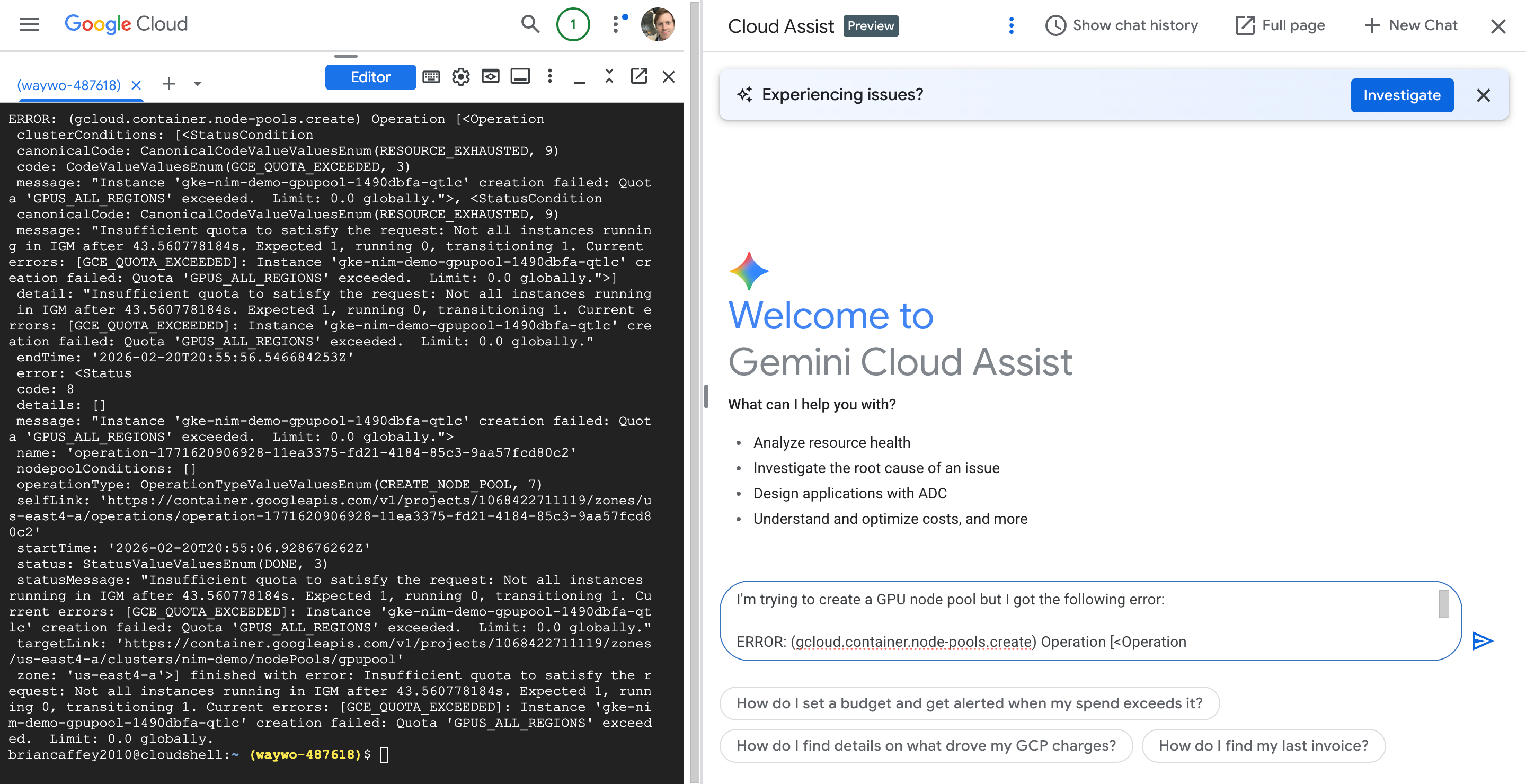
OK, so I need to increase my GPU quota!
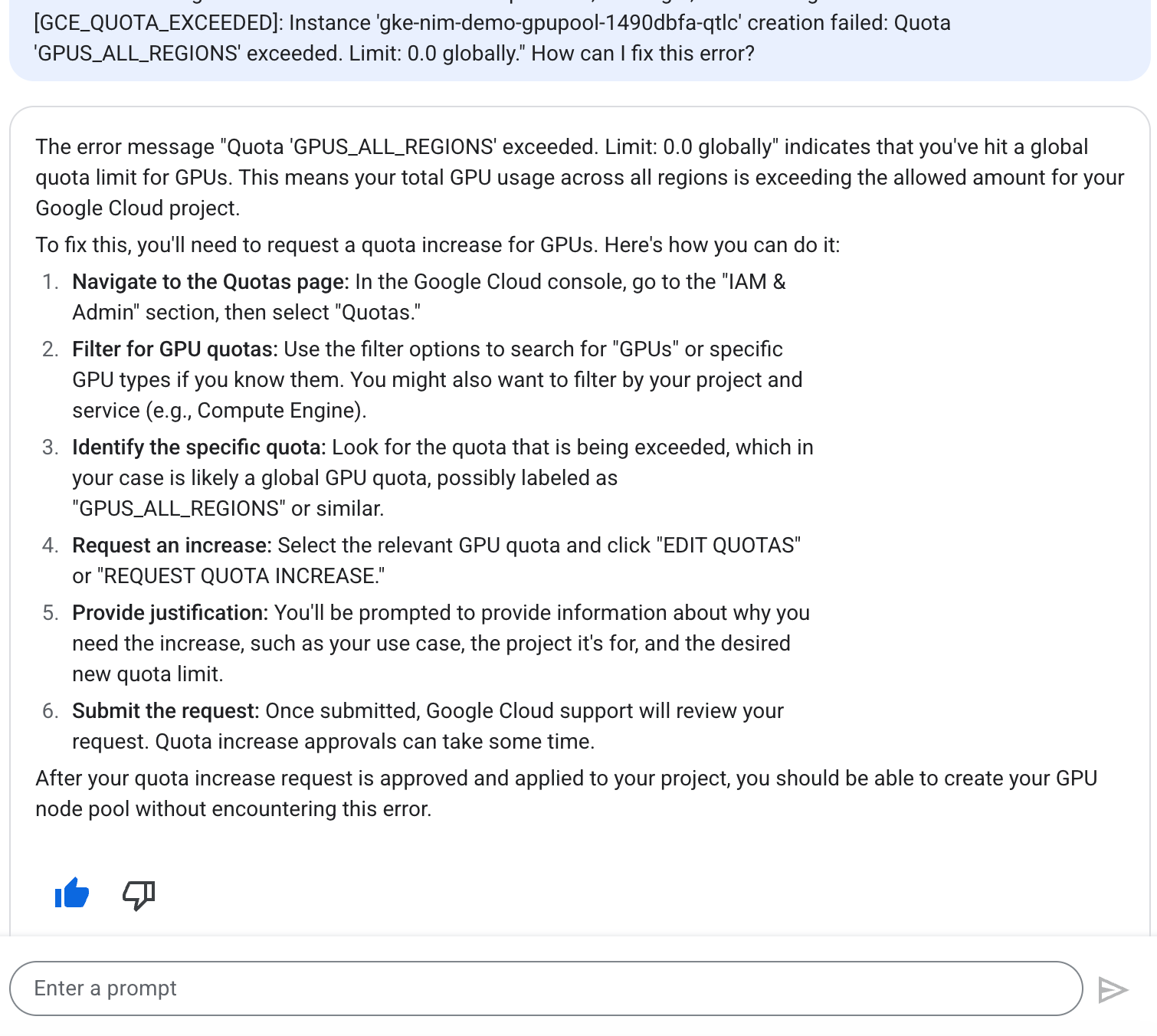
I searched for GPUS_ALL_REGIONS and requested a quote increase for 1 GPU across all regions, then a few moments later got this nice email:
Hello,

Your quota request for waywo-487618 has been approved and your project quota has been adjusted according to the following requested limits:

+------------------+------------+--------+-----------------+----------------+
| NAME             | DIMENSIONS | REGION | REQUESTED LIMIT | APPROVED LIMIT |
+------------------+------------+--------+-----------------+----------------+
| GPUS_ALL_REGIONS |            | GLOBAL |               1 |              1 |
+------------------+------------+--------+-----------------+----------------+

After approval, Quotas can take up to 15 min to be fully visible in the Cloud Console and available to you.

To verify, please navigate to
https://console.cloud.google.com/iam-admin/quotas?project=waywo-487618.

If you find actual limits are greater than expected, this is normal if previous requests were approved with higher limits. Otherwise, please let us know if approved changes are not reflected in your project.

If you want to increase your quota further, please file a new request.

Best regards and happy computing!

Sincerely,
Google Cloud Support
Awesome! There it is!
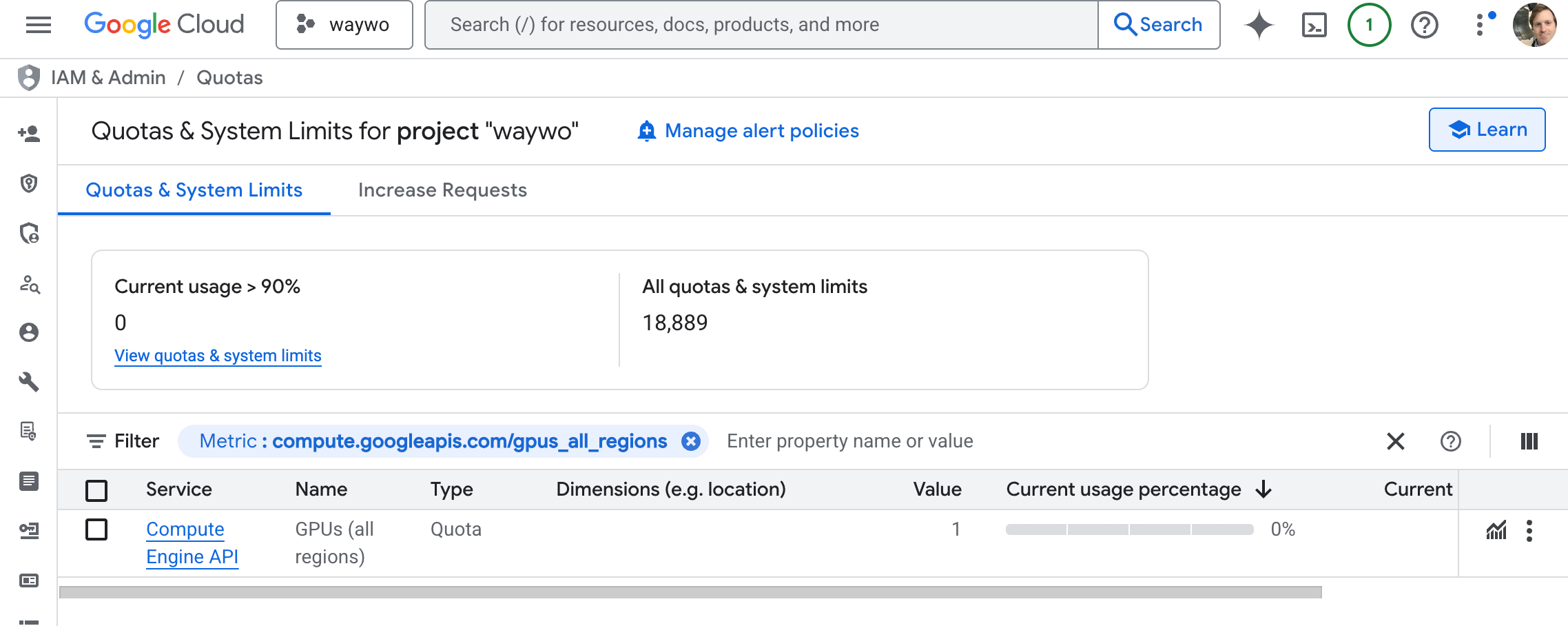
Now let’s try to create the GPU pool again
gcloud container node-pools create gpupool \
    --accelerator type=${GPU_TYPE},count=${GPU_COUNT},gpu-driver-version=latest \
    --project=${PROJECT_ID} \
    --location=${ZONE} \
    --cluster=${CLUSTER_NAME} \
    --machine-type=${NODE_POOL_MACHINE_TYPE} \
    --num-nodes=1
Somehow I got logged out, tried again and apparently I had already created the nodepool!
brian@cloudshell:~ (waywo-487618)$ gcloud container node-pools create gpupool \
    --accelerator type=${GPU_TYPE},count=${GPU_COUNT},gpu-driver-version=latest \
    --project=${PROJECT_ID} \
    --location=${ZONE} \
    --cluster=${CLUSTER_NAME} \
    --machine-type=${NODE_POOL_MACHINE_TYPE} \
    --num-nodes=1
Note: Machines with GPUs have certain limitations which may affect your workflow. Learn more at https://cloud.google.com/kubernetes-engine/docs/how-to/gpus
Note: Starting in GKE 1.30.1-gke.115600, if you don't specify a driver version, GKE installs the default GPU driver for your node's GKE version.
ERROR: (gcloud.container.node-pools.create) ResponseError: code=409, message=Already exists: projects/waywo-487618/zones/us-east4-a/clusters/nim-demo/nodePools/gpupool.
brian@cloudshell:~ (waywo-487618)$
Good to go!
export NGC_CLI_API_KEY="<YOUR NGC API KEY>"
Export the NGC_API_KEY env var
Get the NIM-LLM Helm chart
helm fetch https://helm.ngc.nvidia.com/nim/charts/nim-llm-1.3.0.tgz --username='$oauthtoken' --password=$NGC_CLI_API_KEY
This just downloads a file to our current working directory:
brian@cloudshell:~ (waywo-487618)$ ls
nim-llm-1.3.0.tgz  README-cloudshell.txt
Create a namespace
kubectl create namespace nim
Created!
brian@cloudshell:~ (waywo-487618)$ kubectl create namespace nim
namespace/nim created
Configure secrets
kubectl create secret docker-registry registry-secret --docker-server=nvcr.io --docker-username='$oauthtoken'     --docker-password=$NGC_CLI_API_KEY -n nim

kubectl create secret generic ngc-api --from-literal=NGC_API_KEY=$NGC_CLI_API_KEY -n nim
brian@cloudshell:~ (waywo-487618)$ kubectl create secret docker-registry registry-secret --docker-server=nvcr.io --docker-username='$oauthtoken'     --docker-password=$NGC_CLI_API_KEY -n nim
secret/registry-secret created
brian@cloudshell:~ (waywo-487618)$ kubectl create secret generic ngc-api --from-literal=NGC_API_KEY=$NGC_CLI_API_KEY -n nim
secret/ngc-api created
Cool, this makes sense, I need the NGC API key to both download the container from nvcr (NVIDIA container registry), AND download the model weights from nvcr.
NIM Configuration
cat <<EOF > nim_custom_value.yaml
image:
  repository: "nvcr.io/nim/meta/llama3-8b-instruct" # container location
  tag: 1.0.0 # NIM version you want to deploy
model:
  ngcAPISecret: ngc-api  # name of a secret in the cluster that includes a key named NGC_CLI_API_KEY and is an NGC API key
persistence:
  enabled: true
imagePullSecrets:
  -   name: registry-secret # name of a secret used to pull nvcr.io images, see https://kubernetes.io/docs/tasks/    configure-pod-container/pull-image-private-registry/
EOF
brian@cloudshell:~ (waywo-487618)$ cat <<EOF > nim_custom_value.yaml
image:
  repository: "nvcr.io/nim/meta/llama3-8b-instruct" # container location
  tag: 1.0.0 # NIM version you want to deploy
model:
  ngcAPISecret: ngc-api  # name of a secret in the cluster that includes a key named NGC_CLI_API_KEY and is an NGC API key
persistence:
  enabled: true
imagePullSecrets:
  -   name: registry-secret # name of a secret used to pull nvcr.io images, see https://kubernetes.io/docs/tasks/    configure-pod-container/pull-image-private-registry/
EOF
brian@cloudshell:~ (waywo-487618)$ ls
nim_custom_value.yaml  nim-llm-1.3.0.tgz  README-cloudshell.txt
Create the deployment
brian@cloudshell:~ (waywo-487618)$ helm install my-nim nim-llm-1.1.2.tgz -f nim_custom_value.yaml --namespace nim
Error: INSTALLATION FAILED: non-absolute URLs should be in form of repo_name/path_to_chart, got: nim-llm-1.1.2.tgz
Oops, I got an error. Let’s ask Cloud Assist!
The error message "Error: INSTALLATION FAILED: non-absolute URLs should be in form of repo_name/path_to_chart, got: nim-llm-1.1.2.tgz" indicates that Helm expects a chart reference in a specific format, but it received a local file path.

Here's how to resolve it:

If nim-llm-1.1.2.tgz is a local Helm chart package, you should use a relative path or an absolute path without the repo_name/ prefix.

You can try one of these options:

Using a relative path (if the file is in the current directory):
helm install my-nim ./nim-llm-1.1.2.tgz -f nim_custom_value.yaml --namespace nim
Generated code may be subject to license restrictions not shown here. Use code with care. Learn more

Adding ./ explicitly tells Helm that nim-llm-1.1.2.tgz is a local file in the current directory.
Using an absolute path:
If the file is not in the current directory, provide its full path. For example:
helm install my-nim /path/to/your/nim-llm-1.1.2.tgz -f nim_custom_value.yaml --namespace nim
Generated code may be subject to license restrictions not shown here. Use code with care. Learn more

Replace /path/to/your/ with the actual directory where nim-llm-1.1.2.tgz is located.
The key is to make it clear to Helm that you are providing a local chart archive, not a chart from a Helm repository.
Oh! The helm version is different than the one that was in the guide:
brian@cloudshell:~ (waywo-487618)$ helm install my-nim ./nim-llm-1.1.2.tgz -f nim_custom_value.yaml --namespace nim
Error: INSTALLATION FAILED: path "./nim-llm-1.1.2.tgz" not found
Trying again with v1.3.0, we get a successful installation!
brian@cloudshell:~ (waywo-487618)$ helm install my-nim ./nim-llm-1.3.0.tgz -f nim_custom_value.yaml --namespace nim
NAME: my-nim
LAST DEPLOYED: Fri Feb 20 21:43:37 2026
NAMESPACE: nim
STATUS: deployed
REVISION: 1
DESCRIPTION: Install complete
NOTES:
Thank you for installing nim-llm.

**************************************************
| It may take some time for pods to become ready |
| while model files download                     |
**************************************************

Your NIM version is: 1.0.0
brian@cloudshell:~ (waywo-487618)$
Let’s check on the pod in the nim namespace we created:
brian@cloudshell:~ (waywo-487618)$ kubectl get pods -n nim
NAME               READY   STATUS    RESTARTS   AGE
my-nim-nim-llm-0   0/1     Running   0          2m58s
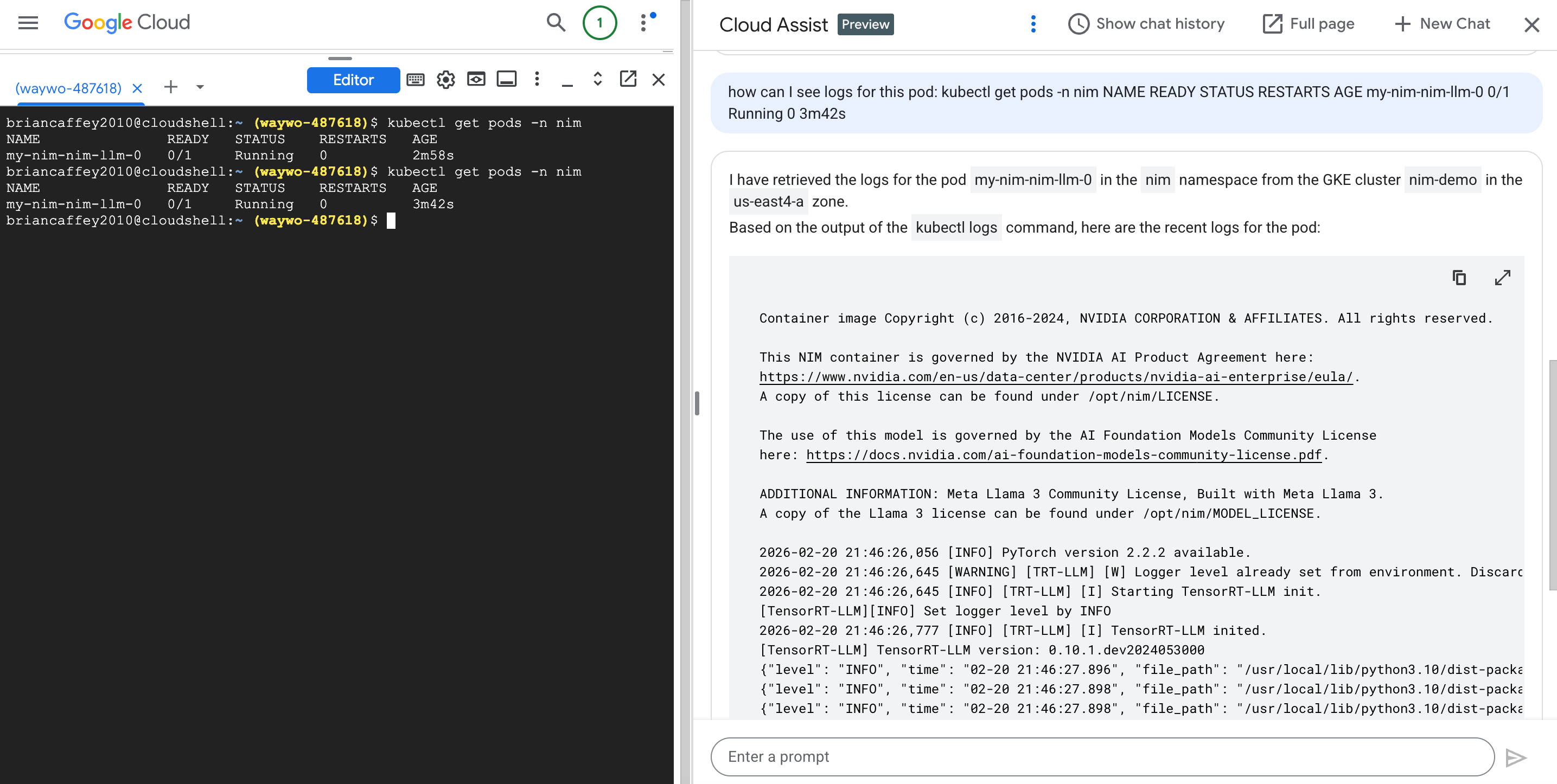
Awesome! Cloud Assist has access to my k8s cluster and was able to show me logs directly in the chat response!
Container image Copyright (c) 2016-2024, NVIDIA CORPORATION & AFFILIATES. All rights reserved.

This NIM container is governed by the NVIDIA AI Product Agreement here:
https://www.nvidia.com/en-us/data-center/products/nvidia-ai-enterprise/eula/.
A copy of this license can be found under /opt/nim/LICENSE.

The use of this model is governed by the AI Foundation Models Community License
here: https://docs.nvidia.com/ai-foundation-models-community-license.pdf.

ADDITIONAL INFORMATION: Meta Llama 3 Community License, Built with Meta Llama 3.
A copy of the Llama 3 license can be found under /opt/nim/MODEL_LICENSE.

2026-02-20 21:46:26,056 [INFO] PyTorch version 2.2.2 available.
2026-02-20 21:46:26,645 [WARNING] [TRT-LLM] [W] Logger level already set from environment. Discard new verbosity: error
2026-02-20 21:46:26,645 [INFO] [TRT-LLM] [I] Starting TensorRT-LLM init.
[TensorRT-LLM][INFO] Set logger level by INFO
2026-02-20 21:46:26,777 [INFO] [TRT-LLM] [I] TensorRT-LLM inited.
[TensorRT-LLM] TensorRT-LLM version: 0.10.1.dev2024053000
{"level": "INFO", "time": "02-20 21:46:27.896", "file_path": "/usr/local/lib/python3.10/dist-packages/vllm_nvext/entrypoints/openai/api_server.py", "line_number": "489", "message": "NIM LLM API version 1.0.0", "exc_info": "None", "stack_info": "None"}
{"level": "INFO", "time": "02-20 21:46:27.898", "file_path": "/usr/local/lib/python3.10/dist-packages/vllm_nvext/hub/ngc_profile.py", "line_number": "217", "message": "Running NIM without LoRA. Only looking for compatible profiles that do not support LoRA.", "exc_info": "None", "stack_info": "None"}
{"level": "INFO", "time": "02-20 21:46:27.898", "file_path": "/usr/local/lib/python3.10/dist-packages/vllm_nvext/hub/ngc_profile.py", "line_number": "219", "message": "Detected 1 compatible profile(s).", "exc_info": "None", "stack_info": "None"}
{"level": "INFO", "time": "02-20 21:46:27.898", "file_path": "/usr/local/lib/python3.10/dist-packages/vllm_nvext/hub/ngc_injector.py", "line_number": "106", "message": "Valid profile: 8835c31752fbc67ef658b20a9f78e056914fdef0660206d82f252d62fd96064d (vllm-fp16-tp1) on GPUs [0]", "exc_info": "None", "stack_info": "None"}
{"level": "INFO", "time": "02-20 21:46:27.898", "file_path": "/usr/local/lib/python3.10/dist-packages/vllm_nvext/hub/ngc_injector.py", "line_number": "141", "message": "Selected profile: 8835c31752fbc67ef658b20a9f78e056914fdef0660206d82f252d62fd96064d (vllm-fp16-tp1)", "exc_info": "None", "stack_info": "None"}
{"level": "INFO", "time": "02-20 21:46:28.585", "file_path": "/usr/local/lib/python3.10/dist-packages/vllm_nvext/hub/ngc_injector.py", "line_number": "146", "message": "Profile metadata: tp: 1", "exc_info": "None", "stack_info": "None"}
{"level": "INFO", "time": "02-20 21:46:28.586", "file_path": "/usr/local/lib/python3.10/dist-packages/vllm_nvext/hub/ngc_injector.py", "line_number": "146", "message": "Profile metadata: llm_engine: vllm", "exc_info": "None", "stack_info": "None"}
{"level": "INFO", "time": "02-20 21:46:28.586", "file_path": "/usr/local/lib/python3.10/dist-packages/vllm_nvext/hub/ngc_injector.py", "line_number": "146", "message": "Profile metadata: precision: fp16", "exc_info": "None", "stack_info": "None"}
{"level": "INFO", "time": "02-20 21:46:28.586", "file_path": "/usr/local/lib/python3.10/dist-packages/vllm_nvext/hub/ngc_injector.py", "line_number": "146", "message": "Profile metadata: feat_lora: false", "exc_info": "None", "stack_info": "None"}
{"level": "INFO", "time": "02-20 21:46:28.586", "file_path": "/usr/local/lib/python3.10/dist-packages/vllm_nvext/hub/ngc_injector.py", "line_number": "166", "message": "Preparing model workspace. This step might download additional files to run the model.", "exc_info": "None", "stack_info": "None"}
{"level": "INFO", "time": "02-20 21:47:14.944", "file_path": "/usr/local/lib/python3.10/dist-packages/vllm_nvext/hub/ngc_injector.py", "line_number": "172", "message": "Model workspace is now ready. It took 46.358 seconds", "exc_info": "None", "stack_info": "None"}
{"level": "INFO", "time": "02-20 21:47:14.949", "file_path": "/usr/local/lib/python3.10/dist-packages/vllm/engine/llm_engine.py", "line_number": "98", "message": "Initializing an LLM engine (v0.4.1) with config: model='/tmp/meta--llama3-8b-instruct-tbtjj6ij', speculative_config=None,
Under the hood, Cloud Assist is calling:
kubectl logs my-nim-nim-llm-0 -n nim
Running this again once the aWe can see some health checks and usage stats in the logs:
{"level": "INFO", "time": "02-20 21:54:59.370", "file_path": "/usr/local/lib/python3.10/dist-packages/vllm/engine/metrics.py", "line_number": "334", "message": "Avg prompt throughput: 0.0 tokens/s, Avg generation throughput: 0.0 tokens/s, Running: 0 reqs, Swapped: 0 reqs, Pending: 0 reqs, GPU KV cache usage: 0.0%, CPU KV cache usage: 0.0%", "exc_info": "None", "stack_info": "None"}
{"level": "INFO", "time": "02-20 21:55:06.801", "file_path": "/usr/local/lib/python3.10/dist-packages/uvicorn/protocols/http/httptools_impl.py", "line_number": "481", "message": "10.28.1.1:49414 - \"GET /v1/health/live HTTP/1.1\" 200", "exc_info": "None", "stack_info": "None"}
{"level": "INFO", "time": "02-20 21:55:06.804", "file_path": "/usr/local/lib/python3.10/dist-packages/uvicorn/protocols/http/httptools_impl.py", "line_number": "481", "message": "10.28.1.1:49420 - \"GET /v1/health/ready HTTP/1.1\" 200", "exc_info": "None", "stack_info": "None"}
Actually, there are a few interesting things I found in the logs since it started up, let’s take a look!
brian@cloudshell:~ (waywo-487618)$ kubectl logs my-nim-nim-llm-0 -n nim

===========================================
== NVIDIA Inference Microservice LLM NIM ==
===========================================

NVIDIA Inference Microservice LLM NIM Version 1.0.0
Model: nim/meta/llama3-8b-instruct

Container image Copyright (c) 2016-2024, NVIDIA CORPORATION & AFFILIATES. All rights reserved.

This NIM container is governed by the NVIDIA AI Product Agreement here:
https://www.nvidia.com/en-us/data-center/products/nvidia-ai-enterprise/eula/.
A copy of this license can be found under /opt/nim/LICENSE.

The use of this model is governed by the AI Foundation Models Community License
here: https://docs.nvidia.com/ai-foundation-models-community-license.pdf.

ADDITIONAL INFORMATION: Meta Llama 3 Community License, Built with Meta Llama 3.
A copy of the Llama 3 license can be found under /opt/nim/MODEL_LICENSE.

2026-02-20 21:46:26,056 [INFO] PyTorch version 2.2.2 available.
2026-02-20 21:46:26,645 [WARNING] [TRT-LLM] [W] Logger level already set from environment. Discard new verbosity: error
2026-02-20 21:46:26,645 [INFO] [TRT-LLM] [I] Starting TensorRT-LLM init.
[TensorRT-LLM][INFO] Set logger level by INFO
2026-02-20 21:46:26,777 [INFO] [TRT-LLM] [I] TensorRT-LLM inited.
[TensorRT-LLM] TensorRT-LLM version: 0.10.1.dev2024053000
{"level": "INFO", "time": "02-20 21:46:27.896", "file_path": "/usr/local/lib/python3.10/dist-packages/vllm_nvext/entrypoints/openai/api_server.py", "line_number": "489", "message": "NIM LLM API version 1.0.0", "exc_info": "None", "stack_info": "None"}
{"level": "INFO", "time": "02-20 21:46:27.898", "file_path": "/usr/local/lib/python3.10/dist-packages/vllm_nvext/hub/ngc_profile.py", "line_number": "217", "message": "Running NIM without LoRA. Only looking for compatible profiles that do not support LoRA.", "exc_info": "None", "stack_info": "None"}
{"level": "INFO", "time": "02-20 21:46:27.898", "file_path": "/usr/local/lib/python3.10/dist-packages/vllm_nvext/hub/ngc_profile.py", "line_number": "219", "message": "Detected 1 compatible profile(s).", "exc_info": "None", "stack_info": "None"}
{"level": "INFO", "time": "02-20 21:46:27.898", "file_path": "/usr/local/lib/python3.10/dist-packages/vllm_nvext/hub/ngc_injector.py", "line_number": "106", "message": "Valid profile: 8835c31752fbc67ef658b20a9f78e056914fdef0660206d82f252d62fd96064d (vllm-fp16-tp1) on GPUs [0]", "exc_info": "None", "stack_info": "None"}
{"level": "INFO", "time": "02-20 21:46:27.898", "file_path": "/usr/local/lib/python3.10/dist-packages/vllm_nvext/hub/ngc_injector.py", "line_number": "141", "message": "Selected profile: 8835c31752fbc67ef658b20a9f78e056914fdef0660206d82f252d62fd96064d (vllm-fp16-tp1)", "exc_info": "None", "stack_info": "None"}
{"level": "INFO", "time": "02-20 21:46:28.585", "file_path": "/usr/local/lib/python3.10/dist-packages/vllm_nvext/hub/ngc_injector.py", "line_number": "146", "message": "Profile metadata: tp: 1", "exc_info": "None", "stack_info": "None"}
{"level": "INFO", "time": "02-20 21:46:28.586", "file_path": "/usr/local/lib/python3.10/dist-packages/vllm_nvext/hub/ngc_injector.py", "line_number": "146", "message": "Profile metadata: llm_engine: vllm", "exc_info": "None", "stack_info": "None"}
{"level": "INFO", "time": "02-20 21:46:28.586", "file_path": "/usr/local/lib/python3.10/dist-packages/vllm_nvext/hub/ngc_injector.py", "line_number": "146", "message": "Profile metadata: precision: fp16", "exc_info": "None", "stack_info": "None"}
{"level": "INFO", "time": "02-20 21:46:28.586", "file_path": "/usr/local/lib/python3.10/dist-packages/vllm_nvext/hub/ngc_injector.py", "line_number": "146", "message": "Profile metadata: feat_lora: false", "exc_info": "None", "stack_info": "None"}
{"level": "INFO", "time": "02-20 21:46:28.586", "file_path": "/usr/local/lib/python3.10/dist-packages/vllm_nvext/hub/ngc_injector.py", "line_number": "166", "message": "Preparing model workspace. This step might download additional files to run the model.", "exc_info": "None", "stack_info": "None"}
{"level": "INFO", "time": "02-20 21:47:14.944", "file_path": "/usr/local/lib/python3.10/dist-packages/vllm_nvext/hub/ngc_injector.py", "line_number": "172", "message": "Model workspace is now ready. It took 46.358 seconds", "exc_info": "None", "stack_info": "None"}

{"level": "INFO", "time": "02-20 21:47:14.949", "file_path": "/usr/local/lib/python3.10/dist-packages/vllm/engine/llm_engine.py", "line_number": "98", "message": "Initializing an LLM engine (v0.4.1) with config: model='/tmp/meta--llama3-8b-instruct-tbtjj6ij', speculative_config=None, tokenizer='/tmp/meta--llama3-8b-instruct-tbtjj6ij', skip_tokenizer_init=False, tokenizer_mode=auto, revision=None, tokenizer_revision=None, trust_remote_code=False, dtype=torch.bfloat16, max_seq_len=8192, download_dir=None, load_format=auto, tensor_parallel_size=1, disable_custom_all_reduce=False, quantization=None, enforce_eager=False, kv_cache_dtype=auto, quantization_param_path=None, device_config=cuda, decoding_config=DecodingConfig(guided_decoding_backend='outlines'), seed=0)", "exc_info": "None", "stack_info": "None"}

{"level": "WARNING", "time": "02-20 21:47:15.373", "file_path": "/usr/local/lib/python3.10/dist-packages/transformers/utils/logging.py", "line_number": "314", "message": "Special tokens have been added in the vocabulary, make sure the associated word embeddings are fine-tuned or trained.", "exc_info": "None", "stack_info": "None"}

{"level": "INFO", "time": "02-20 21:47:15.758", "file_path": "/usr/local/lib/python3.10/dist-packages/vllm/utils.py", "line_number": "609", "message": "Found nccl from library /usr/local/lib/python3.10/dist-packages/nvidia/nccl/lib/libnccl.so.2", "exc_info": "None", "stack_info": "None"}

INFO 02-20 21:47:18 selector.py:28] Using FlashAttention backend.

INFO 02-20 21:47:24 model_runner.py:173] Loading model weights took 14.9595 GB

{"level": "INFO", "time": "02-20 21:47:27.028", "file_path": "/usr/local/lib/python3.10/dist-packages/vllm/executor/gpu_executor.py", "line_number": "119", "message": "# GPU blocks: 1504, # CPU blocks: 2048", "exc_info": "None", "stack_info": "None"}

INFO 02-20 21:47:29 model_runner.py:973] Capturing the model for CUDA graphs. This may lead to unexpected consequences if the model is not static. To run the model in eager mode, set 'enforce_eager=True' or use '--enforce-eager' in the CLI.

INFO 02-20 21:47:29 model_runner.py:977] CUDA graphs can take additional 1~3 GiB memory per GPU. If you are running out of memory, consider decreasing `gpu_memory_utilization` or enforcing eager mode. You can also reduce the `max_num_seqs` as needed to decrease memory usage.

INFO 02-20 21:47:38 model_runner.py:1054] Graph capturing finished in 9 secs.

{"level": "WARNING", "time": "02-20 21:47:38.846", "file_path": "/usr/local/lib/python3.10/dist-packages/transformers/utils/logging.py", "line_number": "314", "message": "Special tokens have been added in the vocabulary, make sure the associated word embeddings are fine-tuned or trained.", "exc_info": "None", "stack_info": "None"}

{"level": "INFO", "time": "02-20 21:47:38.863", "file_path": "/usr/local/lib/python3.10/dist-packages/vllm/entrypoints/openai/serving_chat.py", "line_number": "347", "message": "Using default chat template:\n{% set loop_messages = messages %}{% for message in loop_messages %}{% set content = '<|start_header_id|>' + message['role'] + '<|end_header_id|>\n\n'+ message['content'] | trim + '<|eot_id|>' %}{% if loop.index0 == 0 %}{% set content = bos_token + content %}{% endif %}{{ content }}{% endfor %}{% if add_generation_prompt %}{{ '<|start_header_id|>assistant<|end_header_id|>\n\n' }}{% endif %}", "exc_info": "None", "stack_info": "None"}
{"level": "WARNING", "time": "02-20 21:47:39.246", "file_path": "/usr/local/lib/python3.10/dist-packages/transformers/utils/logging.py", "line_number": "314", "message": "Special tokens have been added in the vocabulary, make sure the associated word embeddings are fine-tuned or trained.", "exc_info": "None", "stack_info": "None"}

{"level": "INFO", "time": "02-20 21:47:39.265", "file_path": "/usr/local/lib/python3.10/dist-packages/vllm_nvext/entrypoints/openai/api_server.py", "line_number": "456", "message": "Serving endpoints:\n  0.0.0.0:8000/openapi.json\n  0.0.0.0:8000/docs\n  0.0.0.0:8000/docs/oauth2-redirect\n  0.0.0.0:8000/metrics\n  0.0.0.0:8000/v1/health/ready\n  0.0.0.0:8000/v1/health/live\n  0.0.0.0:8000/v1/models\n  0.0.0.0:8000/v1/version\n  0.0.0.0:8000/v1/chat/completions\n  0.0.0.0:8000/v1/completions", "exc_info": "None", "stack_info": "None"}

{"level": "INFO", "time": "02-20 21:47:39.265", "file_path": "/usr/local/lib/python3.10/dist-packages/vllm_nvext/entrypoints/openai/api_server.py", "line_number": "460", "message": "An example cURL request:\ncurl -X 'POST' \\\n  'http://0.0.0.0:8000/v1/chat/completions' \\\n  -H 'accept: application/json' \\\n  -H 'Content-Type: application/json' \\\n  -d '{\n    \"model\": \"meta/llama3-8b-instruct\",\n    \"messages\": [\n      {\n        \"role\":\"user\",\n        \"content\":\"Hello! How are you?\"\n      },\n      {\n        \"role\":\"assistant\",\n        \"content\":\"Hi! I am quite well, how can I help you today?\"\n      },\n      {\n        \"role\":\"user\",\n        \"content\":\"Can you write me a song?\"\n      }\n    ],\n    \"top_p\": 1,\n    \"n\": 1,\n    \"max_tokens\": 15,\n    \"stream\": true,\n    \"frequency_penalty\": 1.0,\n    \"stop\": [\"hello\"]\n  }'\n", "exc_info": "None", "stack_info": "None"}
{"level": "INFO", "time": "02-20 21:47:39.336", "file_path": "/usr/local/lib/python3.10/dist-packages/uvicorn/server.py", "line_number": "82", "message": "Started server process [32]", "exc_info": "None", "stack_info": "None"}
{"level": "INFO", "time": "02-20 21:47:39.336", "file_path": "/usr/local/lib/python3.10/dist-packages/uvicorn/lifespan/on.py", "line_number": "48", "message": "Waiting for application startup.", "exc_info": "None", "stack_info": "None"}
{"level": "INFO", "time": "02-20 21:47:39.338", "file_path": "/usr/local/lib/python3.10/dist-packages/uvicorn/lifespan/on.py", "line_number": "62", "message": "Application startup complete.", "exc_info": "None", "stack_info": "None"}
{"level": "INFO", "time": "02-20 21:47:39.340", "file_path": "/usr/local/lib/python3.10/dist-packages/uvicorn/server.py", "line_number": "214", "message": "Uvicorn running on http://0.0.0.0:8000 (Press CTRL+C to quit)", "exc_info": "None", "stack_info": "None"}

// the rest of the logs are just health checks and stats

// health check
{"level": "INFO", "time": "02-20 21:54:56.805", "file_path": "/usr/local/lib/python3.10/dist-packages/uvicorn/protocols/http/httptools_impl.py", "line_number": "481", "message": "10.28.1.1:35412 - \"GET /v1/health/ready HTTP/1.1\" 200", "exc_info": "None", "stack_info": "None"}
// stats
{"level": "INFO", "time": "02-20 21:54:59.370", "file_path": "/usr/local/lib/python3.10/dist-packages/vllm/engine/metrics.py", "line_number": "334", "message": "Avg prompt throughput: 0.0 tokens/s, Avg generation throughput: 0.0 tokens/s, Running: 0 reqs, Swapped: 0 reqs, Pending: 0 reqs, GPU KV cache usage: 0.0%, CPU KV cache usage: 0.0%", "exc_info": "None", "stack_info": "None"}
Now it is running! Yay!
brian@cloudshell:~ (waywo-487618)$ kubectl get pods -n nim
NAME               READY   STATUS    RESTARTS   AGE
my-nim-nim-llm-0   1/1     Running   0          6m26s
Let’s just poke around a little bit:
brian@cloudshell:~ (waywo-487618)$ kubectl exec -it my-nim-nim-llm-0 -n nim -- nvidia-smi
Fri Feb 20 22:02:53 2026
+-----------------------------------------------------------------------------------------+
| NVIDIA-SMI 580.105.08             Driver Version: 580.105.08     CUDA Version: 13.0     |
+-----------------------------------------+------------------------+----------------------+
| GPU  Name                 Persistence-M | Bus-Id          Disp.A | Volatile Uncorr. ECC |
| Fan  Temp   Perf          Pwr:Usage/Cap |           Memory-Usage | GPU-Util  Compute M. |
|                                         |                        |               MIG M. |
|=========================================+========================+======================|
|   0  NVIDIA L4                      Off |   00000000:00:03.0 Off |                    0 |
| N/A   62C    P0             37W /   72W |   19140MiB /  23034MiB |      0%      Default |
|                                         |                        |                  N/A |
+-----------------------------------------+------------------------+----------------------+

+-----------------------------------------------------------------------------------------+
| Processes:                                                                              |
|  GPU   GI   CI              PID   Type   Process name                        GPU Memory |
|        ID   ID                                                               Usage      |
|=========================================================================================|
|    0   N/A  N/A              32      C   python3                               19124MiB |
+-----------------------------------------------------------------------------------------+
brian@cloudshell:~ (waywo-487618)$
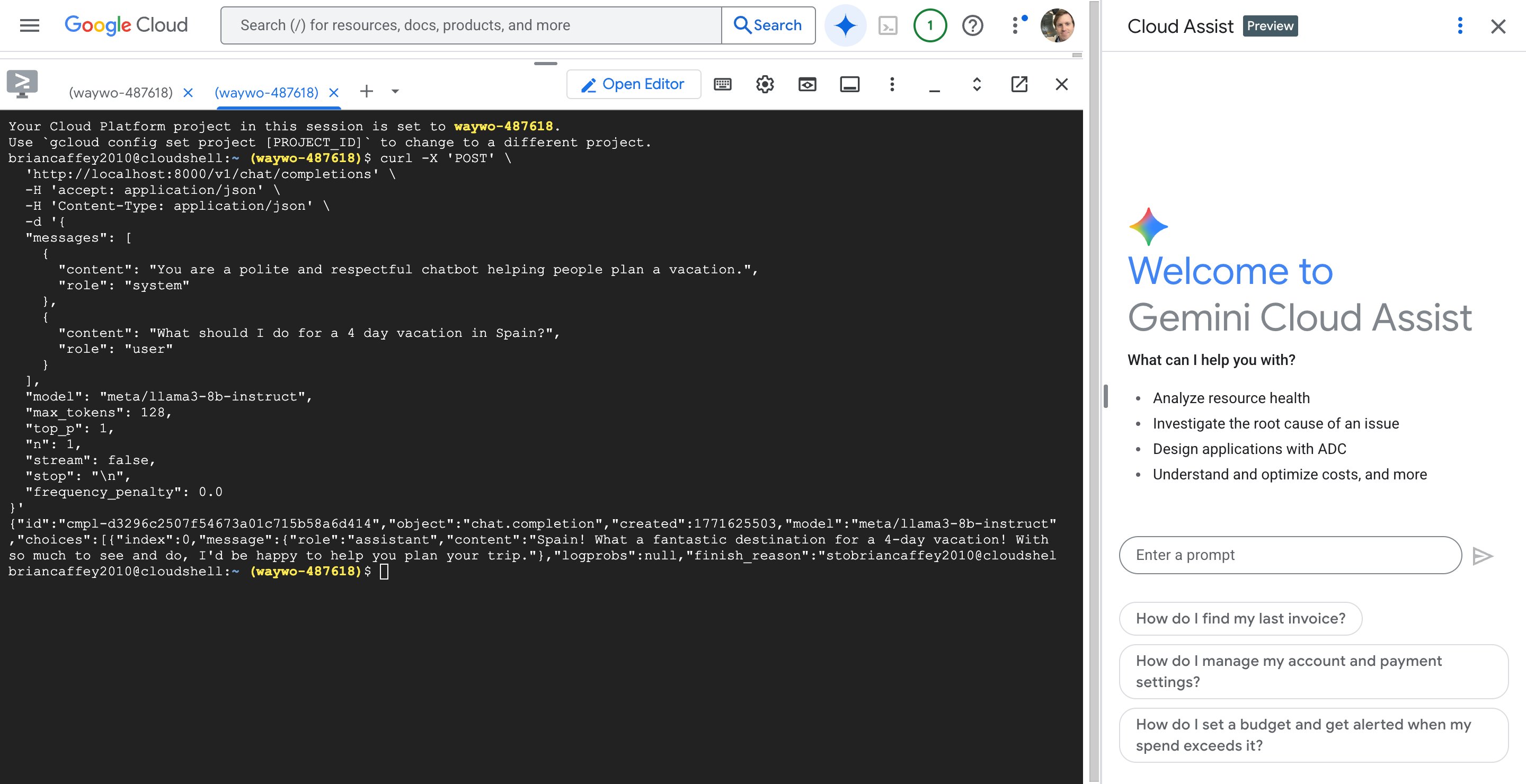
Let’s query the LLM! Up until now I have been doing everything in the Cloud Shell terminal. Let’s port forward traffic to localhost:8000. Let’s run the following command in one Cloud Shell terminal
kubectl port-forward service/my-nim-nim-llm 8000:8000 -n nim
Then, in another Cloud Shell terminal, let’s send a request:
curl -X 'POST' \
  'http://localhost:8000/v1/chat/completions' \
  -H 'accept: application/json' \
  -H 'Content-Type: application/json' \
  -d '{
  "messages": [
    {
      "content": "You are a polite and respectful chatbot helping people plan a vacation.",
      "role": "system"
    },
    {
      "content": "What should I do for a 4 day vacation in Spain?",
      "role": "user"
    }
  ],
  "model": "meta/llama3-8b-instruct",
  "max_tokens": 128,
  "top_p": 1,
  "n": 1,
  "stream": false,
  "stop": "\n",
  "frequency_penalty": 0.0
}'
Nice! We got a response from Llama 3 8B Instruct LLM served by TensorRT-LLM running in an NVIDIA NIM container orchestrated by GKE on GCP!!
brian@cloudshell:~ (waywo-487618)$ curl -X 'POST' \
  'http://localhost:8000/v1/chat/completions' \
  -H 'accept: application/json' \
  -H 'Content-Type: application/json' \
  -d '{
  "messages": [
    {
      "content": "You are a polite and respectful chatbot helping people plan a vacation.",
      "role": "system"
    },
    {
      "content": "What should I do for a 4 day vacation in Spain?",
      "role": "user"
    }
  ],
  "model": "meta/llama3-8b-instruct",
  "max_tokens": 128,
  "top_p": 1,
  "n": 1,
  "stream": false,
  "stop": "\n",
  "frequency_penalty": 0.0
}'
{"id":"cmpl-d3296c2507f54673a01c715b58a6d414","object":"chat.completion","created":1771625503,"model":"meta/llama3-8b-instruct","choices":[{"index":0,"message":{"role":"assistant","content":"Spain! What a fantastic destination for a 4-day vacation! With so much to see and do, I'd be happy to help you plan your trip."},"logprobs":null,"finish_reason":"stobrian@cloudshel
brian@cloudshell:~ (waywo-487618)$
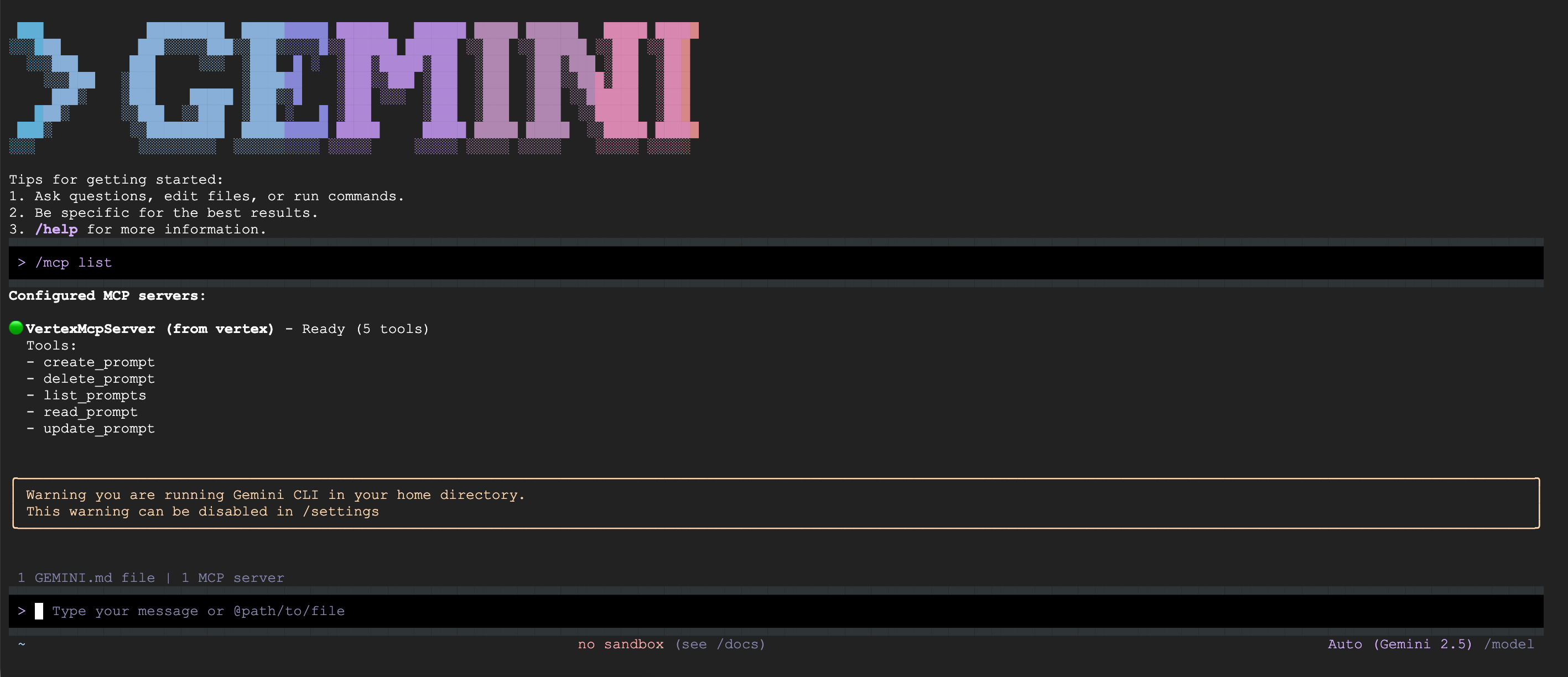
That was fun. Using the Cloud Terminal shell and Cloud Assist super convenient! Gemini CLI is probably pretty amazing to use in Cloud Terminal, too. There’s also a gcloud-mcp server from Google, I wonder why this isn’t installed by default? https://github.com/googleapis/gcloud-mcp. The gke-mcp MCP server also looks interesting: https://github.com/GoogleCloudPlatform/gke-mcp. Gemini + MCP servers in Cloud Shell seems like a really powerful way to both build and debug!
Infrastructure as Code
I found Deploy an AI model on GKE with NVIDIA NIM to be a really informative way to take first steps with NIMs on GKE, it was awesome! Building everything logically step by step helped me map cloud concepts to GKE from my understanding of AWS with EKS and ECS for container orchestration. However, the automation engineer in me wanted to know how I could take this great NIM deployment example and fully automate with Infrastructure as Code! Getting this working would be a helpful stepping stone to getting my waywo app deployed on GKE, with multiple NIMs, nodes, bells, and whistles!
Cleanup
Don’t forget to clean up the resources! That’s the next part of the Deploy an AI model on GKE with NVIDIA NIM tutorial.
This can be done with just one simple command:
gcloud container clusters delete $CLUSTER_NAME --zone=$ZONE
Good night, gcloud! ☁️ 🌝
brian@cloudshell:~ (waywo-487618)$ gcloud container clusters delete $CLUSTER_NAME --zone=$ZONE
The following clusters will be deleted.
 - [nim-demo] in [us-east4-a]

Do you want to continue (Y/n)?

Deleting cluster nim-demo...done.
Deleted [https://container.googleapis.com/v1/projects/waywo-487618/zones/us-east4-a/clusters/nim-demo].
Learning!
Sweet! New learning officially unlocked!
What’s Next? 👉 NIM deployment on GKE with IaC (feat. Pulumi!)
That was a fun tutorial! It adds up to a lot of one-off commands that can all be run through Cloud Terminal. Knowing how everything works, spinning everything up would be tedious! For a next step, I want to see if I can spin up this same demo using Infrastructure as Code. I’ll choose Pulumi, it is basically like Terraform, but it can be written in any language which gives lots of advantages over HCL (Hashicorp Configuration Language).
Currently OpenAI’s Codex is free, and I have been using it heavily, in addition to lots of open source coding agent CLI tools like Claude Code, Qwen Code, OpenCode, etc. I’m basically going to prompt Codex with all of the text of the Deploy an AI model on GKE with NVIDIA NIM tutorial, examples of Pulumi with GCP and GKE, and instructions about what I want. I’m pretty confident that Codex will be able to one-shot this. I suppose I could also use the Gemini CLI!
My goal is basically to:
- run
pulumi upfrom my laptop, - configure
kubectlto point to the cluster using outputs, - port-forward and then
- make requests to the LLM NIM
Goal: setting up NIM on GKE with Pulumi
I would like to deploy an NVIDIA NIM on Google Cloud Platform (GCP) with Google Kubernetes Engine (GKE), and I would like to do this using Pulumi.
Here is a Google Kubernetes Engine (GKE) Tutorial: https://www.pulumi.com/registry/packages/kubernetes/how-to-guides/gke/
I recently did a tutorial that shows how to set up a NIM on GKE using gcloud commands and kubectl commands, and I would like to automate this as much as possible with Infrastructure as Code. I would like you to use Pulumi, written in TypeScript, and using the pulumi cli. Let's add all of the Pulumi TypeScript code in a top level directory called nim-on-gke/ (please create this directory if it doesn't exist).
The goals are to keep this simple and for demonstration purposes. The primary goal is to demonstrate setting up the infrastructure such as node and gpu pools, deploying the containers and other resources in the GKE cluster and then finally exposing a port with port forwarding and performing LLM inference with a curl request that makes and OpenAI API call for basic chat completion. Otherwise please use clean, well-written and well-documented code. And include a comprehensive nim-on-gke/README.md file that documents what the Pulumi code does.
Below I will provide the content of the tutorial and you will make a detailed plan for building a Pulumi stack that can deploy everything. We do not need to follow rigourous cloud engineering practices, we just want to focus on the essential components that are covered by the below tutorial.
Here are the steps from the tutorial (Steps 5, 6 and 7 from the tutorial are the only steps you need to see):
- Create a GKE cluster with GPUs Open Cloud Shell or your terminal. Specify the following parameters:
export PROJECT_ID=
Create GKE Cluster:
gcloud container clusters create ${CLUSTER_NAME}
--project=${PROJECT_ID}
--location=${ZONE}
--release-channel=rapid
--machine-type=${CLUSTER_MACHINE_TYPE}
--num-nodes=1
Create GPU node pool:
gcloud container node-pools create gpupool
--accelerator type=${GPU_TYPE},count=${GPU_COUNT},gpu-driver-version=latest
--project=${PROJECT_ID}
--location=${ZONE}
--cluster=${CLUSTER_NAME}
--machine-type=${NODE_POOL_MACHINE_TYPE}
--num-nodes=1
- Configure NVIDIA NGC API Key The NGC API key allows you to pull custom images from NVIDIA NGC. To specify your key:
export NGC_CLI_API_KEY="
- Deploy and test NVIDIA NIM Fetch NIM LLM Helm Chart:
helm fetch https://helm.ngc.nvidia.com/nim/charts/nim-llm-1.3.0.tgz --username='$oauthtoken' --password=$NGC_CLI_API_KEY Create a NIM Namespace:
kubectl create namespace nim Configure secrets:
kubectl create secret docker-registry registry-secret --docker-server=nvcr.io --docker-username='$oauthtoken' --docker-password=$NGC_CLI_API_KEY -n nim
kubectl create secret generic ngc-api --from-literal=NGC_API_KEY=$NGC_CLI_API_KEY -n nim Setup NIM Configuration:
cat <
- name: registry-secret # name of a secret used to pull nvcr.io images, see https://kubernetes.io/docs/tasks/ configure-pod-container/pull-image-private-registry/ EOF Launching NIM deployment:
helm install my-nim nim-llm-1.3.0.tgz -f nim_custom_value.yaml --namespace nim Verify NIM pod is running:
kubectl get pods -n nim Testing NIM deployment: Once we've verified that our NIM service was deployed successfully, we can make inference requests to see what type of feedback we'll receive from the NIM service. In order to do this, we enable port forwarding on the service to be able to access the NIM from our localhost on port 8000:
kubectl port-forward service/my-nim-nim-llm 8000:8000 -n nim Next, we can open another terminal or tab in the cloud shell and try the following request:
curl -X 'POST'
'http://localhost:8000/v1/chat/completions'
-H 'accept: application/json'
-H 'Content-Type: application/json'
-d '{
"messages":
{
"content": "You are a polite and respectful chatbot helping people plan a vacation.",
"role": "system"
},
{
"content": "What should I do for a 4 day vacation in Spain?",
"role": "user"
}
,
"model": "meta/llama3-8b-instruct",
"max_tokens": 128,
"top_p": 1,
"n": 1,
"stream": false,
"stop": "\n",
"frequency_penalty": 0.0
}'
If you get a chat completion from the NIM service, that means the service is working as expected!
Here are some things you might want to consider:
- We may need to provide environment variables for the project ID in GCP and NGC_API_KEY, otherwise default to what the tutorial uses
- For the region and zone please use REGION=us-east4 and ZONE=us-east4-a
- we can just store our Pulumi state in the local file system, we don't need to use Pulumi Cloud
- use Pulumi outputs for helpful things like kubectl config that we can use locally for configuring our local kubectl for accessing our GKE Cluster
- For Pulumi, we might want to consider splitting things into two stacks: one stack for the cluster and node pools, and another stack for the kubernetes resources
Let me know if you have any other questions or if you need clarification on anything here. Please feel free to look up Pulumi and GKE documentation from the internet.
First let's make a plan, then I'll review and answer any questions, then we will proceed with implementation and code when we are both ready.
You will then write the code, and then finally you will give me precise constructions for the pulumi commands needed for deploying the infrastructure and kubernetes resources, kubectl configuration and port forwarding command, and then LLM inference test commands, finally followed by cleanup commands using pulumi destroy and any other commands needed to ensure things are cleaned up properly.
Please use available CLI tools and Pulumi commands to verify your work at each step if and when possible, such as checking Pulumi outputs. You can also tell me to run commands if that is easier.
Also, by the way, you will be building this as part of an application that has already been written. For now you don't need to reference any other code in the repository, so don't bother exploring other files, just focus on the nim-on-gke directory in which you are working.
OpenAI Codex
I made a new thread in Codex with the above section as the prompt.
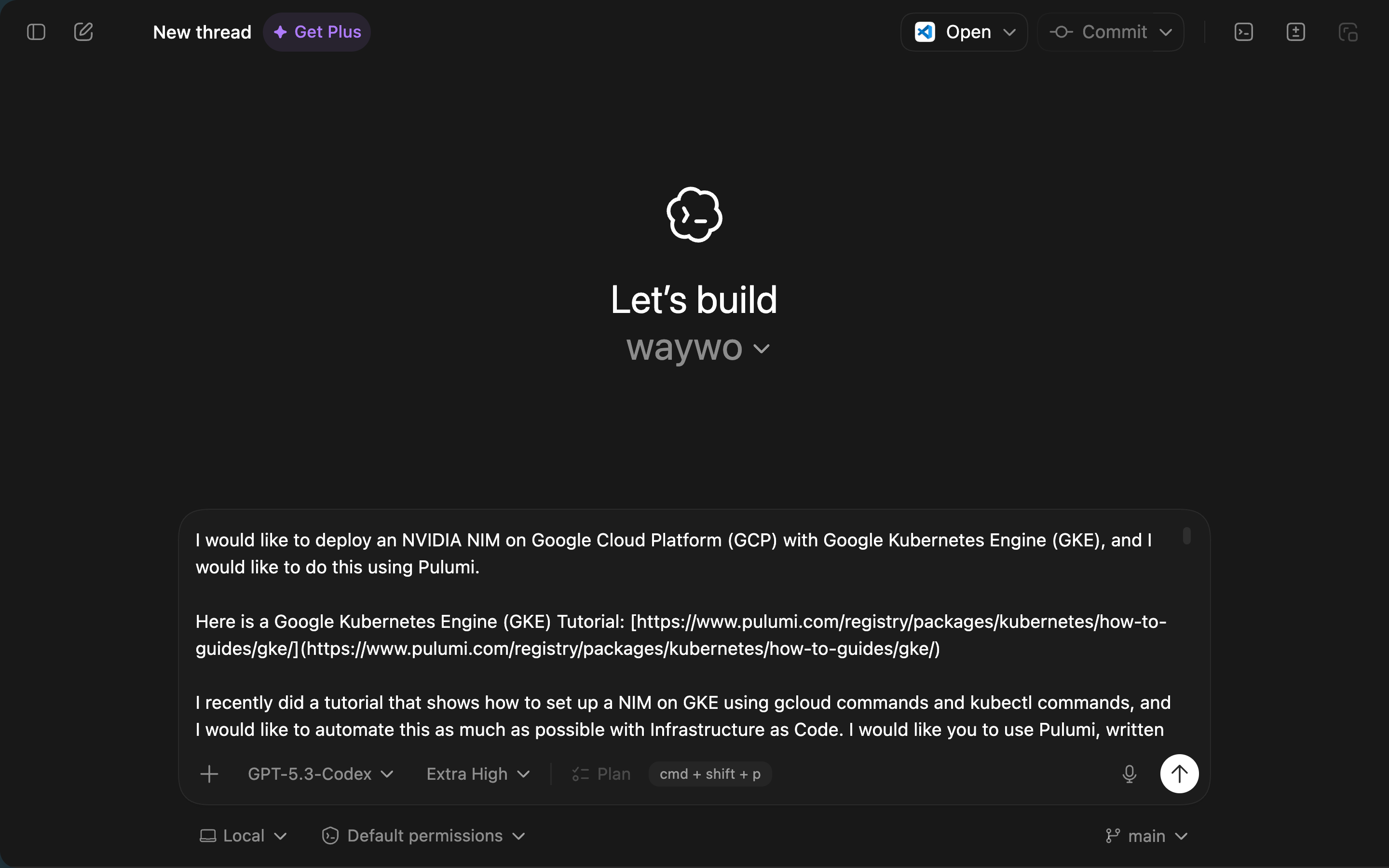
Here is what Codex responded with:
Skill usage: no skill invoked (skill-creator / skill-installer are not applicable to this task).
Proposed Plan
- Create a clean demo layout under
/Users/brian/git/waywo/nim-on-gke/with two Pulumi TypeScript projects.
/Users/brian/git/waywo/nim-on-gke/infra/: GKE cluster + GPU node pool./Users/brian/git/waywo/nim-on-gke/workloads/: namespace, secrets, NIM Helm release./Users/brian/git/waywo/nim-on-gke/README.md: full setup/deploy/test/cleanup guide.- Optional convenience scripts in
/Users/brian/git/waywo/nim-on-gke/scripts/for command wrappers.
- Build the infra Pulumi project (
/Users/brian/git/waywo/nim-on-gke/infra/) for GKE.
- Configurable inputs (with defaults from your tutorial):
projectId(required)region=us-east4zone=us-east4-aclusterName=nim-democlusterMachineType=e2-standard-4gpuNodePoolMachineType=g2-standard-16gpuType=nvidia-l4gpuCount=1
- Resources:
- GKE cluster (Rapid release channel, zonal cluster in
us-east4-a, 1 CPU node). - Separate GPU node pool (
gpupool) with L4 GPU config and 1 node.
- GKE cluster (Rapid release channel, zonal cluster in
- Outputs:
- Cluster name/zone.
- API endpoint and CA.
- Generated kubeconfig (Pulumi output).
gcloud container clusters get-credentials ...helper command string.
- Build the workloads Pulumi project (
/Users/brian/git/waywo/nim-on-gke/workloads/) for Kubernetes resources.
- Inputs:
infraStackRef(cross-stack reference to infra stack).ngcApiKey(Pulumi secret).- Optional model/image/chart overrides.
- Resources:
- Namespace
nim. - Docker registry secret
registry-secretfornvcr.iowith username$oauthtoken. - Generic secret
ngc-apicontainingNGC_API_KEY(and optionallyNGC_CLI_API_KEYalias for compatibility). - Helm release for
nim-llmchart (version1.3.0) with:image.repository=nvcr.io/nim/meta/llama3-8b-instructimage.tag=1.0.0model.ngcAPISecret=ngc-apipersistence.enabled=trueimagePullSecrets=[{name: registry-secret}]
- Namespace
- Outputs:
- Namespace, release name, expected service name.
- Ready-to-run
kubectl port-forward ...command. - Ready-to-run
curlinference command template.
- Add comprehensive docs in
/Users/brian/git/waywo/nim-on-gke/README.md.
- Prerequisites:
- Pulumi CLI, Node.js, npm, kubectl, gcloud +
gke-gcloud-auth-plugin.
- Pulumi CLI, Node.js, npm, kubectl, gcloud +
- Local state setup:
pulumi login file:///...(local backend only).
- End-to-end command sequence:
- Install deps, init/select stacks, set config,
pulumi upinfra then workloads. - Verify with
pulumi stack outputandkubectl get pods -n nim. - Port-forward and run OpenAI-compatible chat completion curl.
- Install deps, init/select stacks, set config,
- Cleanup:
- Destroy workloads first, then infra.
- Remove local kube context and optional local state directory.
- Verification strategy during implementation.
- Run TypeScript build checks in each project.
- Run
pulumi previewfor both projects. - If cloud access isn’t available in this environment, I’ll still validate code structure/types and provide exact commands for you to run on a machine with GCP access.
- I already checked this environment:
pulumiandkubectlexist, butgcloudis not installed here, so live GKE deployment verification will need your local machine or Cloud Shell.
Key Implementation Decisions (for your approval)
- Use two Pulumi projects/states (
infrathenworkloads) with cross-stack references. - Keep to tutorial-equivalent minimal scope (no extra VPC/IAM hardening beyond what’s necessary).
- Install NIM via Pulumi Helm
Releasedirectly from NVIDIA Helm repo using NGC key auth (no manualhelm fetchstep). - Keep runtime access testing as explicit imperative commands (
kubectl port-forward+curl) documented in README.
Questions Before I Implement
- Do you want stack names as
devfor both projects (nim-gke-infra/devandnim-gke-workloads/dev), or do you preferdemo? - Should I pin chart/model exactly as
nim-llm 1.3.0+meta/llama3-8b-instruct:1.0.0, or make these defaults but configurable? - Do you want me to include a small
Makefilein/Users/brian/git/waywo/nim-on-gke/for one-command deploy/test/destroy helpers?
If this plan looks right, I’ll proceed with full implementation next.
Here's my repsonse:
The key implementation decisions all sound great! Keep it simple, no VPC, no IAM. We might add these later as part of additional work, but don't worry about it for the current implementation.
For your questions:
- Yes you can use
devas the name for both stacks - Yes, you can hardcode the pinned versions
- Sure, you can include a Makefile in the nim-on-gke directory
Yep! Codex nailed it. Really nailed it. At least for the specs that I gave it!
I have pulumi, gcloud and kubectl installed on my laptop.
Before running the commands that Codex prepared, I had a warning from gcloud:
~/git/waywo/nim-on-gke$ gcloud auth application-default login
Your browser has been opened to visit:

<auth link>


Credentials saved to file: [/Users/brian/.config/gcloud/application_default_credentials.json]

These credentials will be used by any library that requests Application Default Credentials (ADC).
WARNING:
Cannot find a quota project to add to ADC. You might receive a "quota exceeded" or "API not enabled" error. Run $ gcloud auth application-default set-quota-project to add a quota project.
Gemini was able to help with this:
▀▀▀▀▀▀▀▀▀▀▀▀▀▀▀▀▀▀▀▀▀▀▀▀▀▀▀▀▀▀▀▀▀▀▀▀▀▀▀▀▀▀▀▀▀▀▀▀▀▀▀▀▀▀▀▀▀▀▀▀▀▀▀▀▀▀▀▀▀▀▀▀▀▀▀▀▀▀▀▀▀▀▀▀▀▀▀▀▀▀▀▀▀▀▀▀▀▀▀▀▀▀▀▀▀▀▀▀▀▀▀▀▀▀▀▀▀▀▀▀▀▀▀▀▀▀▀
 > OK, my project ID is waywo-487618. Can you help me run that command with this project ID
▄▄▄▄▄▄▄▄▄▄▄▄▄▄▄▄▄▄▄▄▄▄▄▄▄▄▄▄▄▄▄▄▄▄▄▄▄▄▄▄▄▄▄▄▄▄▄▄▄▄▄▄▄▄▄▄▄▄▄▄▄▄▄▄▄▄▄▄▄▄▄▄▄▄▄▄▄▄▄▄▄▄▄▄▄▄▄▄▄▄▄▄▄▄▄▄▄▄▄▄▄▄▄▄▄▄▄▄▄▄▄▄▄▄▄▄▄▄▄▄▄▄▄▄▄▄▄
✦ I will configure your Application Default Credentials (ADC) to use waywo-487618 as the quota project, ensuring Google Cloud
  knows which project's limits to apply to your API requests.


╭─────────────────────────────────────────────────────────────────────────────────────────────────────────────────────────────╮
│ Action Required                                                                                                             │
│                                                                                                                             │
│ ?  Shell gcloud auth application-default set-quota-project waywo-487618 [current working directory /Users/brian/git/waywo/… │
│                                                                                                                             │
│ gcloud auth application-default set-quota-project waywo-487618                                                              │
│ Allow execution of: 'gcloud'?                                                                                               │
│                                                                                                                             │
│ ● 1. Allow once                                                                                                             │
│   2. Allow for this session                                                                                                 │
│   3. No, suggest changes (esc)                                                                                              │
│                                                                                                                             │
╰─────────────────────────────────────────────────────────────────────────────────────────────────────────────────────────────╯
Now I can set up the infra stack:
~/git/waywo/nim-on-gke$ make infra-up PROJECT_ID="$PROJECT_ID" PULUMI_SECRETS_PASSPHRASE="$PULUMI_SECRETS_PASSPHRASE"

Previewing update (dev):
     Type                       Name               Plan       Info
 +   pulumi:pulumi:Stack        nim-gke-infra-dev  create
     ├─ pulumi:providers:gcp    default_8_41_1                1 warning
 +   ├─ gcp:container:Cluster   nim-demo           create
 +   └─ gcp:container:NodePool  gpupool            create

Diagnostics:
  pulumi:providers:gcp (default_8_41_1):
    warning: unable to detect a global setting for GCP Project.
    Pulumi will rely on per-resource settings for this operation.
    Set the GCP Project by using:
        `pulumi config set gcp:project <project>`
    If you would like to disable this warning use:
        `pulumi config set gcp:disableGlobalProjectWarning true`

Outputs:
    clusterEndpoint            : output<string>
    clusterName                : "nim-demo"
    clusterNameOutput          : "nim-demo"
    gcpProjectId               : "waywo-487618"
    getCredentialsCommand      : "gcloud container clusters get-credentials nim-demo --zone us-east4-a --project waywo-487618"
    getCredentialsCommandOutput: "gcloud container clusters get-credentials nim-demo --zone us-east4-a --project waywo-487618"
    gpuNodePoolNameOutput      : "gpupool"
    kubeconfig                 : output<string>
    kubeconfigOutput           : output<string>
    regionOutput               : "us-east4"
    zone                       : "us-east4-a"
    zoneOutput                 : "us-east4-a"

Resources:
    + 3 to create

Do you want to perform this update? yes
Updating (dev):
     Type                       Name               Status             Info
 +   pulumi:pulumi:Stack        nim-gke-infra-dev  created (399s)
     ├─ pulumi:providers:gcp    default_8_41_1                        1 warning
 +   ├─ gcp:container:Cluster   nim-demo           created (315s)
 +   └─ gcp:container:NodePool  gpupool            created (81s)

Diagnostics:
  pulumi:providers:gcp (default_8_41_1):
    warning: unable to detect a global setting for GCP Project.
    Pulumi will rely on per-resource settings for this operation.
    Set the GCP Project by using:
        `pulumi config set gcp:project <project>`
    If you would like to disable this warning use:
        `pulumi config set gcp:disableGlobalProjectWarning true`

Outputs:
    clusterEndpoint            : "34.186.97.5"
    clusterName                : "nim-demo"
    clusterNameOutput          : "nim-demo"
    gcpProjectId               : "waywo-487618"
    getCredentialsCommand      : "gcloud container clusters get-credentials nim-demo --zone us-east4-a --project waywo-487618"
    getCredentialsCommandOutput: "gcloud container clusters get-credentials nim-demo --zone us-east4-a --project waywo-487618"
    gpuNodePoolNameOutput      : "gpupool"
    kubeconfig                 : [secret]
    kubeconfigOutput           : [secret]
    regionOutput               : "us-east4"
    zone                       : "us-east4-a"
    zoneOutput                 : "us-east4-a"

Resources:
    + 3 created

Duration: 6m40s
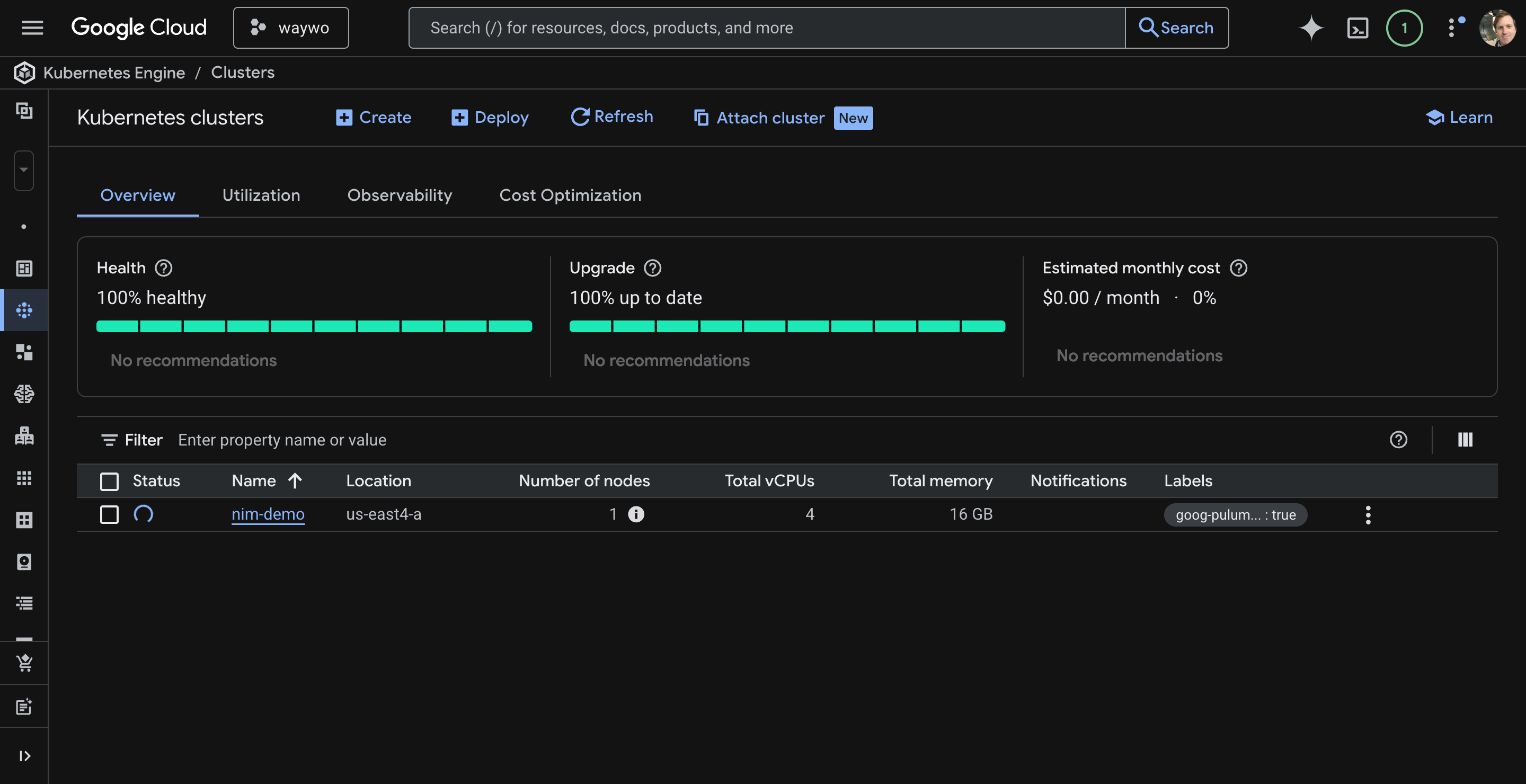
Next step is to configure kubectl, I had a few small hiccups:
~/git/waywo/nim-on-gke/infra$ gcloud container clusters get-credentials nim-demo --zone us-east4-a --project waywo-487618
Fetching cluster endpoint and auth data.
CRITICAL: ACTION REQUIRED: gke-gcloud-auth-plugin, which is needed for continued use of kubectl, was not found or is not executable. Install gke-gcloud-auth-plugin for use with kubectl by following https://cloud.google.com/kubernetes-engine/docs/how-to/cluster-access-for-kubectl#install_plugin
kubeconfig entry generated for nim-demo.
~/git/waywo/nim-on-gke/infra$
That sounds important!
~/git/waywo/nim-on-gke/infra$   gcloud components install gke-gcloud-auth-plugin


Your current Google Cloud CLI version is: 557.0.0
Installing components from version: 557.0.0

┌────────────────────────────────────────────────────────────────┐
│              These components will be installed.               │
├────────────────────────────────────────────┬─────────┬─────────┤
│                    Name                    │ Version │   Size  │
├────────────────────────────────────────────┼─────────┼─────────┤
│ gke-gcloud-auth-plugin (Platform Specific) │  0.5.11 │ 3.6 MiB │
└────────────────────────────────────────────┴─────────┴─────────┘


For the latest full release notes, please visit:
  https://cloud.google.com/sdk/release_notes

Once started, canceling this operation may leave your SDK installation in an inconsistent state.

Do you want to continue (Y/n)?
Performing in place update...

╔════════════════════════════════════════════════════════════╗
╠═ Downloading: gke-gcloud-auth-plugin                      ═╣
╠════════════════════════════════════════════════════════════╣
╠═ Downloading: gke-gcloud-auth-plugin (Platform Specific)  ═╣
╠════════════════════════════════════════════════════════════╣
╠═ Installing: gke-gcloud-auth-plugin                       ═╣
╠════════════════════════════════════════════════════════════╣
╠═ Installing: gke-gcloud-auth-plugin (Platform Specific)   ═╣
╚════════════════════════════════════════════════════════════╝


Google Cloud CLI works best with Python 3.13 and certain modules.

Setting up virtual environment
Updating modules...
Collecting cryptography==42.0.7
  Downloading https://github.com/googleapis/enterprise-certificate-proxy/releases/download/v0.3.6/cryptography-42.0.7-cp39-abi3-macosx_10_12_universal2.whl (5.6 MB)
     ━━━━━━━━━━━━━━━━━━━━━━━━━━━━━━━━━━━━━━━━ 5.6/5.6 MB 31.4 MB/s  0:00:00
Requirement already satisfied: crcmod in /Users/brian/.config/gcloud/virtenv/lib/python3.13/site-packages (1.7)
Requirement already satisfied: grpcio in /Users/brian/.config/gcloud/virtenv/lib/python3.13/site-packages (1.78.1)
Requirement already satisfied: pyopenssl==24.2.1 in /Users/brian/.config/gcloud/virtenv/lib/python3.13/site-packages (24.2.1)
Requirement already satisfied: google_crc32c in /Users/brian/.config/gcloud/virtenv/lib/python3.13/site-packages (1.8.0)
Requirement already satisfied: certifi in /Users/brian/.config/gcloud/virtenv/lib/python3.13/site-packages (2026.1.4)
Requirement already satisfied: setuptools in /Users/brian/.config/gcloud/virtenv/lib/python3.13/site-packages (82.0.0)
Requirement already satisfied: cffi>=1.12 in /Users/brian/.config/gcloud/virtenv/lib/python3.13/site-packages (from cryptography==42.0.7) (2.0.0)
Requirement already satisfied: typing-extensions~=4.12 in /Users/brian/.config/gcloud/virtenv/lib/python3.13/site-packages (from grpcio) (4.15.0)
Requirement already satisfied: pycparser in /Users/brian/.config/gcloud/virtenv/lib/python3.13/site-packages (from cffi>=1.12->cryptography==42.0.7) (3.0)
Modules updated.
Virtual env enabled.

Performing post processing steps...done.

Update done!
Now I can run the above gcloud command again with no critical errors:
~/git/waywo/nim-on-gke/infra$ gcloud container clusters get-credentials nim-demo --zone us-east4-a --project waywo-487618
Fetching cluster endpoint and auth data.
kubeconfig entry generated for nim-demo.
Nice!
~/git/waywo/nim-on-gke/infra$ kubectl get no
NAME                                      STATUS   ROLES    AGE   VERSION
gke-nim-demo-default-pool-415965ed-823l   Ready    <none>   13m   v1.35.0-gke.2398000
gke-nim-demo-gpupool-9920f098-kz28        Ready    <none>   11m   v1.35.0-gke.2398000
Next, we can go ahead and deploy our next stack that will create a deployment for our NIM in our GKE cluster:
~/git/waywo/nim-on-gke$ make workloads-up NGC_API_KEY="$NGC_API_KEY"

Previewing update (dev):
     Type                             Name                   Plan       Info
 +   pulumi:pulumi:Stack              nim-gke-workloads-dev  create     1 error
     └─ pulumi:pulumi:StackReference  nim-gke-infra/dev                 1 error

Diagnostics:
  pulumi:pulumi:StackReference (nim-gke-infra/dev):
    error: Preview failed: organization name must be 'organization'

  pulumi:pulumi:Stack (nim-gke-workloads-dev):
    error: preview failed

Resources:
    + 1 to create

make: *** [workloads-up] Error 255
This resulted in an error!
Codex made a quick for for that, it was related to some naming issue.
Now the preview works for the workloads stack!
Previewing update (dev):
     Type                              Name                   Plan
 +   pulumi:pulumi:Stack               nim-gke-workloads-dev  create
 +   ├─ pulumi:providers:kubernetes    gke-provider           create
 +   ├─ kubernetes:core/v1:Namespace   nim-namespace          create
 +   ├─ kubernetes:core/v1:Secret      registry-secret        create
 +   ├─ kubernetes:core/v1:Secret      ngc-api                create
 +   └─ kubernetes:helm.sh/v3:Release  nim-llm-release        create

Outputs:
    curlCommand             : "curl -X POST \\\n  \"http://localhost:8000/v1/chat/completions\" \\\n  -H \"accept: application/json\" \\\n  -H \"Content-Type: application/json\" \\\n  -d '{\n  \"messages\": [\n    {\n      \"content\": \"You are a polite and respectful chatbot helping people plan a vacation.\",\n      \"role\": \"system\"\n    },\n    {\n      \"content\": \"What should I do for a 4 day vacation in Spain?\",\n      \"role\": \"user\"\n    }\n  ],\n  \"model\": \"meta/llama3-8b-instruct\",\n  \"max_tokens\": 128,\n  \"top_p\": 1,\n  \"n\": 1,\n  \"stream\": false,\n  \"stop\": \"\\n\",\n  \"frequency_penalty\": 0.0\n}'"
    curlCommandOutput       : "curl -X POST \\\n  \"http://localhost:8000/v1/chat/completions\" \\\n  -H \"accept: application/json\" \\\n  -H \"Content-Type: application/json\" \\\n  -d '{\n  \"messages\": [\n    {\n      \"content\": \"You are a polite and respectful chatbot helping people plan a vacation.\",\n      \"role\": \"system\"\n    },\n    {\n      \"content\": \"What should I do for a 4 day vacation in Spain?\",\n      \"role\": \"user\"\n    }\n  ],\n  \"model\": \"meta/llama3-8b-instruct\",\n  \"max_tokens\": 128,\n  \"top_p\": 1,\n  \"n\": 1,\n  \"stream\": false,\n  \"stop\": \"\\n\",\n  \"frequency_penalty\": 0.0\n}'"
    helmReleaseName         : "my-nim"
    infraStackReference     : "organization/nim-gke-infra/dev"
    listPodsCommand         : "kubectl get pods -n nim"
    listServicesCommand     : "kubectl get svc -n nim"
    namespaceName           : "nim"
    nimServiceName          : "my-nim-nim-llm"
    portForwardCommand      : "kubectl port-forward service/my-nim-nim-llm 8000:8000 -n nim"
    portForwardCommandOutput: "kubectl port-forward service/my-nim-nim-llm 8000:8000 -n nim"

Resources:
    + 6 to create

Do you want to perform this update?  [Use arrows to move, type to filter]
  yes
> no
  details
I got another error trying to deploy this stack:
Do you want to perform this update? yes
Updating (dev):
     Type                             Name                   Status                  Info
 +   pulumi:pulumi:Stack              nim-gke-workloads-dev  **creating failed**     1 error
 +   ├─ pulumi:providers:kubernetes   gke-provider           created (0.00s)
 +   └─ kubernetes:core/v1:Namespace  nim-namespace          **creating failed**     1 error

Diagnostics:
  pulumi:pulumi:Stack (nim-gke-workloads-dev):
    error: update failed

  kubernetes:core/v1:Namespace (nim-namespace):
    error: configured Kubernetes cluster is unreachable: unable to load schema information from the API server: Get "https://34.186.97.5/openapi/v2?timeout=32s": getting credentials: exec: executable gke-gcloud-auth-plugin not found

    It looks like you are trying to use a client-go credential plugin that is not installed.

    To learn more about this feature, consult the documentation available at:
          https://kubernetes.io/docs/reference/access-authn-authz/authentication/#client-go-credential-plugins

    Install gke-gcloud-auth-plugin and configure gcloud credentials.

Resources:
    + 2 created

Duration: 2s

make: *** [workloads-up] Error 255
Codex made a few changes to help resolve my gke auth plugin issue. Then I tried deploying the workload stack again:
Previewing update (dev):
     Type                              Name                   Plan
     pulumi:pulumi:Stack               nim-gke-workloads-dev
 ~   ├─ pulumi:providers:kubernetes    gke-provider           update
 +   ├─ kubernetes:core/v1:Namespace   nim-namespace          create
 +   ├─ kubernetes:core/v1:Secret      ngc-api                create
 +   ├─ kubernetes:core/v1:Secret      registry-secret        create
 +   └─ kubernetes:helm.sh/v3:Release  nim-llm-release        create

Outputs:
  + curlCommand             : "curl -X POST \\\n  \"http://localhost:8000/v1/chat/completions\" \\\n  -H \"accept: application/json\" \\\n  -H \"Content-Type: application/json\" \\\n  -d '{\n  \"messages\": [\n    {\n      \"content\": \"You are a polite and respectful chatbot helping people plan a vacation.\",\n      \"role\": \"system\"\n    },\n    {\n      \"content\": \"What should I do for a 4 day vacation in Spain?\",\n      \"role\": \"user\"\n    }\n  ],\n  \"model\": \"meta/llama3-8b-instruct\",\n  \"max_tokens\": 128,\n  \"top_p\": 1,\n  \"n\": 1,\n  \"stream\": false,\n  \"stop\": \"\\n\",\n  \"frequency_penalty\": 0.0\n}'"
  + curlCommandOutput       : "curl -X POST \\\n  \"http://localhost:8000/v1/chat/completions\" \\\n  -H \"accept: application/json\" \\\n  -H \"Content-Type: application/json\" \\\n  -d '{\n  \"messages\": [\n    {\n      \"content\": \"You are a polite and respectful chatbot helping people plan a vacation.\",\n      \"role\": \"system\"\n    },\n    {\n      \"content\": \"What should I do for a 4 day vacation in Spain?\",\n      \"role\": \"user\"\n    }\n  ],\n  \"model\": \"meta/llama3-8b-instruct\",\n  \"max_tokens\": 128,\n  \"top_p\": 1,\n  \"n\": 1,\n  \"stream\": false,\n  \"stop\": \"\\n\",\n  \"frequency_penalty\": 0.0\n}'"
  + helmReleaseName         : "my-nim"
  + infraStackReference     : "organization/nim-gke-infra/dev"
  + listPodsCommand         : "kubectl get pods -n nim"
  + listServicesCommand     : "kubectl get svc -n nim"
  + namespaceName           : "nim"
  + nimServiceName          : "my-nim-nim-llm"
  + portForwardCommand      : "kubectl port-forward service/my-nim-nim-llm 8000:8000 -n nim"
  + portForwardCommandOutput: "kubectl port-forward service/my-nim-nim-llm 8000:8000 -n nim"

Resources:
    + 4 to create
    ~ 1 to update
    5 changes. 1 unchanged

Do you want to perform this update? yes
Updating (dev):
     Type                              Name                   Status
     pulumi:pulumi:Stack               nim-gke-workloads-dev
 ~   ├─ pulumi:providers:kubernetes    gke-provider           updated (0.00s)
 +   ├─ kubernetes:core/v1:Namespace   nim-namespace          created (0.08s)
 +   ├─ kubernetes:core/v1:Secret      ngc-api                created (0.06s)
 +   ├─ kubernetes:core/v1:Secret      registry-secret        created (0.06s)
 +   └─ kubernetes:helm.sh/v3:Release  nim-llm-release        created (244s)

Outputs:
  + curlCommand             : "curl -X POST \\\n  \"http://localhost:8000/v1/chat/completions\" \\\n  -H \"accept: application/json\" \\\n  -H \"Content-Type: application/json\" \\\n  -d '{\n  \"messages\": [\n    {\n      \"content\": \"You are a polite and respectful chatbot helping people plan a vacation.\",\n      \"role\": \"system\"\n    },\n    {\n      \"content\": \"What should I do for a 4 day vacation in Spain?\",\n      \"role\": \"user\"\n    }\n  ],\n  \"model\": \"meta/llama3-8b-instruct\",\n  \"max_tokens\": 128,\n  \"top_p\": 1,\n  \"n\": 1,\n  \"stream\": false,\n  \"stop\": \"\\n\",\n  \"frequency_penalty\": 0.0\n}'"
  + curlCommandOutput       : "curl -X POST \\\n  \"http://localhost:8000/v1/chat/completions\" \\\n  -H \"accept: application/json\" \\\n  -H \"Content-Type: application/json\" \\\n  -d '{\n  \"messages\": [\n    {\n      \"content\": \"You are a polite and respectful chatbot helping people plan a vacation.\",\n      \"role\": \"system\"\n    },\n    {\n      \"content\": \"What should I do for a 4 day vacation in Spain?\",\n      \"role\": \"user\"\n    }\n  ],\n  \"model\": \"meta/llama3-8b-instruct\",\n  \"max_tokens\": 128,\n  \"top_p\": 1,\n  \"n\": 1,\n  \"stream\": false,\n  \"stop\": \"\\n\",\n  \"frequency_penalty\": 0.0\n}'"
  + helmReleaseName         : "my-nim"
  + infraStackReference     : "organization/nim-gke-infra/dev"
  + listPodsCommand         : "kubectl get pods -n nim"
  + listServicesCommand     : "kubectl get svc -n nim"
  + namespaceName           : "nim"
  + nimServiceName          : "my-nim-nim-llm"
  + portForwardCommand      : "kubectl port-forward service/my-nim-nim-llm 8000:8000 -n nim"
  + portForwardCommandOutput: "kubectl port-forward service/my-nim-nim-llm 8000:8000 -n nim"

Resources:
    + 4 created
    ~ 1 updated
    5 changes. 1 unchanged

Duration: 4m8s
Great, I was able to see the pods coming up while Pulumi was deploying the stack:
~$ kubectl get pods -n nim
NAME               READY   STATUS    RESTARTS   AGE
my-nim-nim-llm-0   0/1     Running   0          3m9s
Now I can port forward and then try running inference on the NIM!
~/git/waywo/nim-on-gke$ kubectl port-forward service/my-nim-nim-llm 8000:8000 -n nim
Forwarding from 127.0.0.1:8000 -> 8000
Forwarding from [::1]:8000 -> 8000
This time I'll configure my local instance of Open WebUI to point to the NIM:
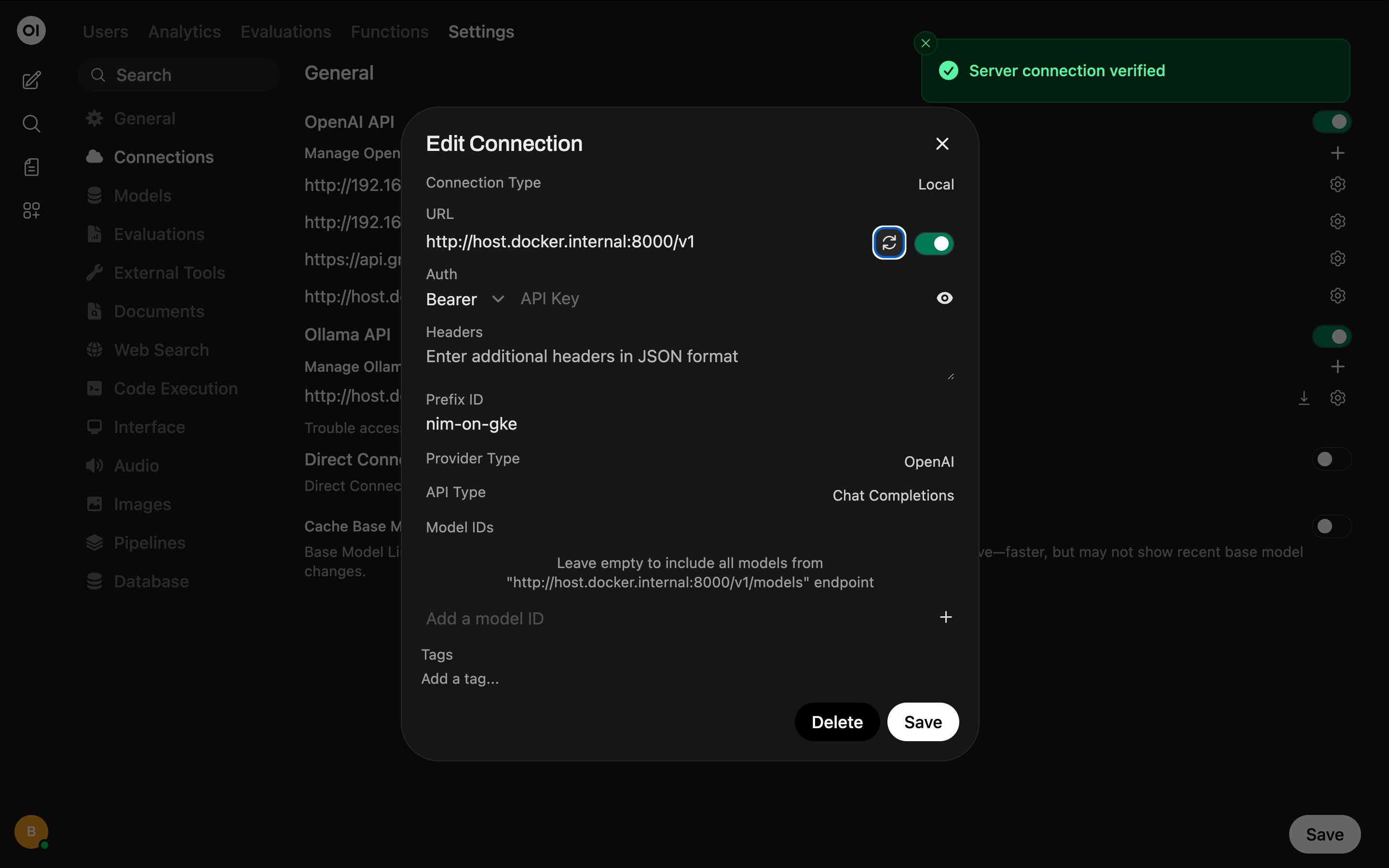
Now let's ask it for a random fact about the Roman Empire:
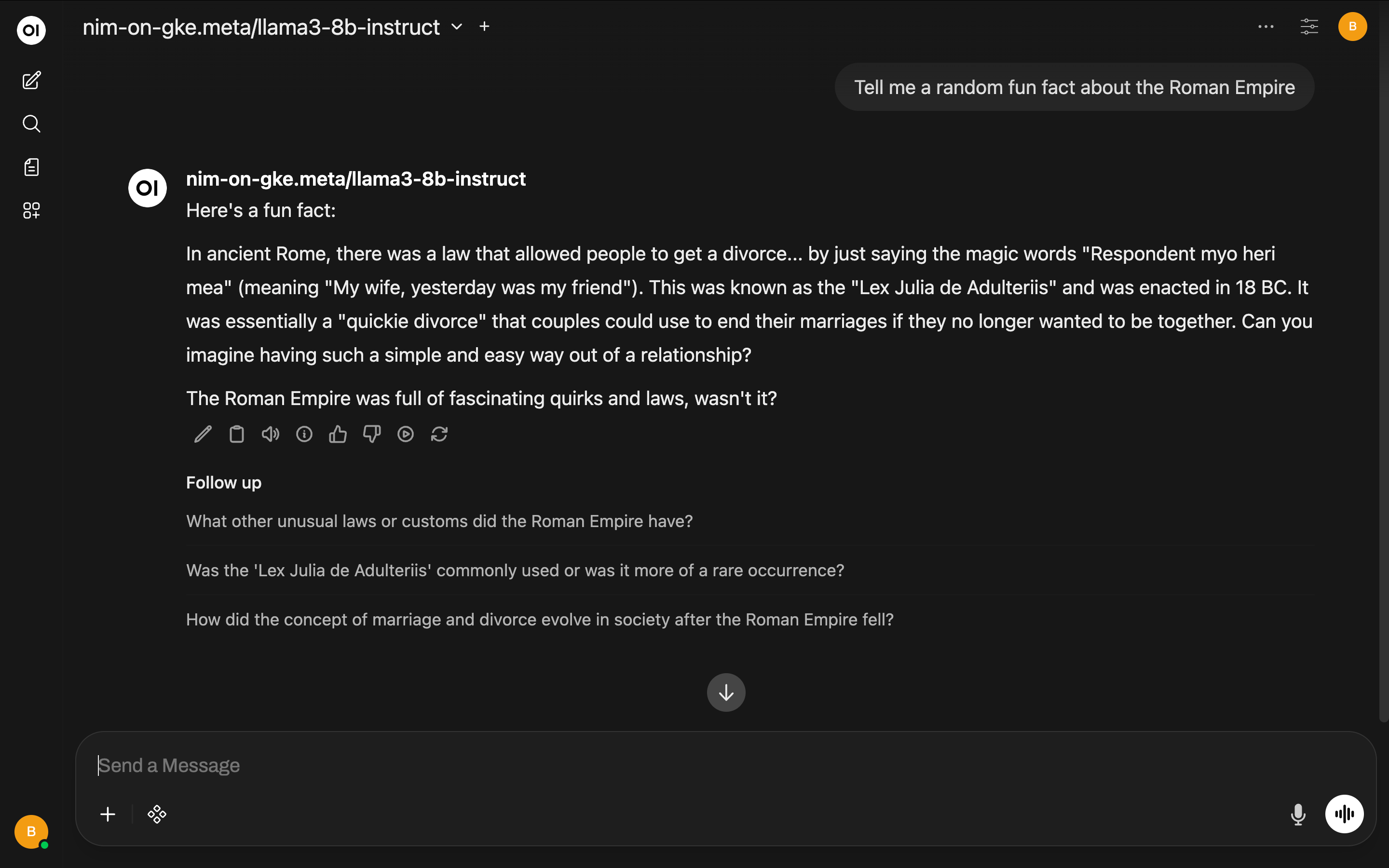
~/git/waywo/nim-on-gke$ kubectl port-forward service/my-nim-nim-llm 8000:8000 -n nim
Forwarding from 127.0.0.1:8000 -> 8000
Forwarding from [::1]:8000 -> 8000
Handling connection for 8000
Handling connection for 8000
Handling connection for 8000
Handling connection for 8000
Handling connection for 8000
Great, everything works. Let's not forget to clean up. We don't want to leave a cloud GPU instance running! And we need to make sure that our commands for destroying the stacks and associated infrastructure don't have any issues.
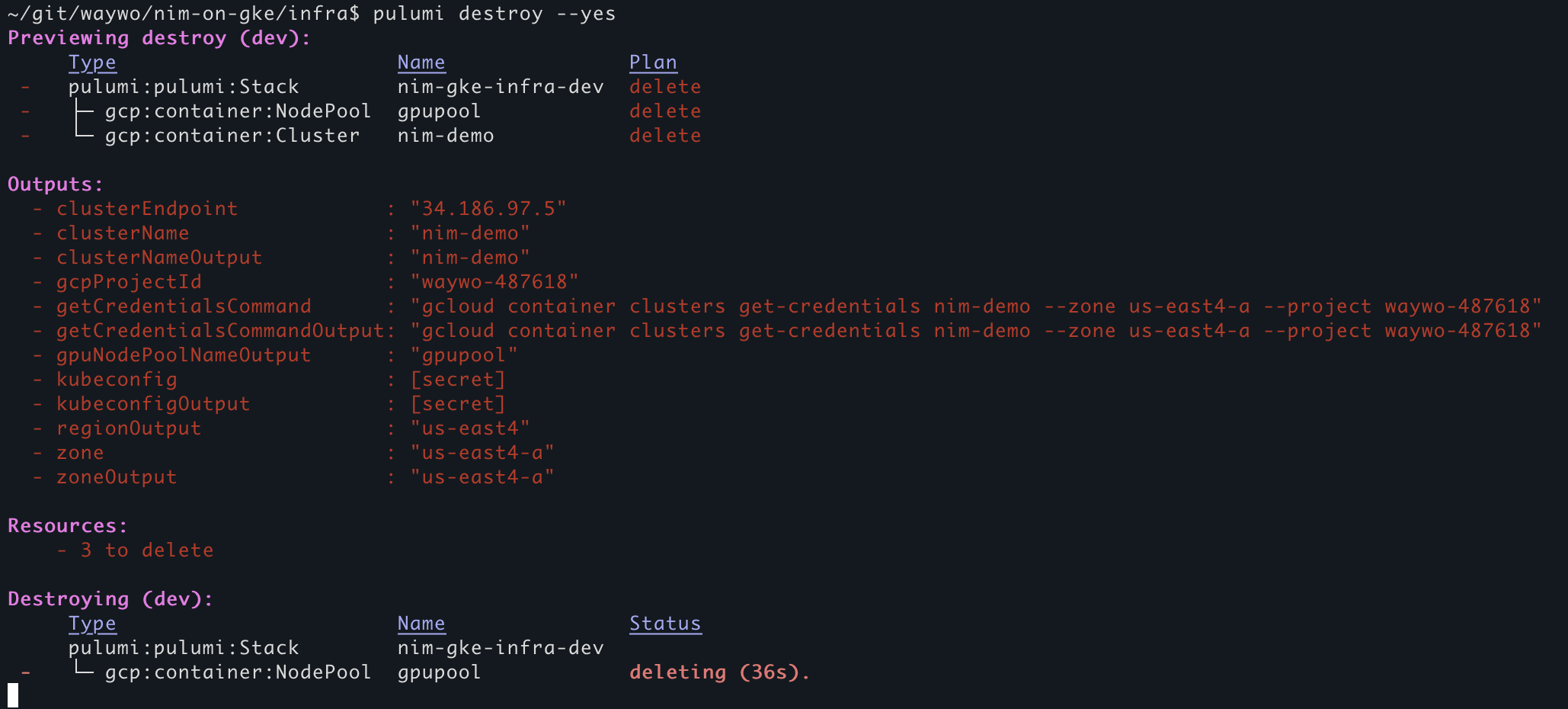
Resources:
    - 3 to delete

Destroying (dev):
     Type                       Name               Status
 -   pulumi:pulumi:Stack        nim-gke-infra-dev  deleted (0.00s)
 -   ├─ gcp:container:NodePool  gpupool            deleted (71s)
 -   └─ gcp:container:Cluster   nim-demo           deleted (232s)

Outputs:
  - clusterEndpoint            : "34.186.97.5"
  - clusterName                : "nim-demo"
  - clusterNameOutput          : "nim-demo"
  - gcpProjectId               : "waywo-487618"
  - getCredentialsCommand      : "gcloud container clusters get-credentials nim-demo --zone us-east4-a --project waywo-487618"
  - getCredentialsCommandOutput: "gcloud container clusters get-credentials nim-demo --zone us-east4-a --project waywo-487618"
  - gpuNodePoolNameOutput      : "gpupool"
  - kubeconfig                 : [secret]
  - kubeconfigOutput           : [secret]
  - regionOutput               : "us-east4"
  - zone                       : "us-east4-a"
  - zoneOutput                 : "us-east4-a"

Resources:
    - 3 deleted

Duration: 5m4s

The resources in the stack have been deleted, but the history and configuration associated with the stack are still maintained.
If you want to remove the stack completely, run `pulumi stack rm dev`.
~/git/waywo/nim-on-gke/infra$ pulumi stack rm dev
This will permanently remove the 'dev' stack!
Please confirm that this is what you'd like to do by typing `dev`: dev
Stack 'dev' has been removed!
~/git/waywo/nim-on-gke/infra$
Awesome! We now have a way to spin up NIMs on GKE using Pulumi with just a few commands that run in under 10 minutes! This keeps the custom CLI commands to a minimum and captures all of the dependencies in code while still being easily configurable via environment variables.
The code for this can be found in my waywo repo: https://github.com/briancaffey/waywo.
Security Best Practices & Disclaimers
Security Note: This tutorial uses environment variables for configuration, which is good practice. Never commit .env files with real credentials to version control. Use GCP IAM roles and service accounts for production deployments.
Version Disclaimer: The Kubernetes version shown (1.35.0) is current as of February 2026. Check GKE release notes for the latest versions. For production environments, consider using the "stable" or "regular" release channels instead of "rapid" for better stability.
Project-Specific Details: The project ID and project number shown in this tutorial are from my test environment. You'll see your own values when running these commands in your GCP account. Create a new project in the Google Cloud Console before following this tutorial.
Now what's next?
Pulumi and other "infrastructure as code" (IaC) tools are really great for automating repeatable, predictable and configurable cloud resources. Fronteir AI coding agents are incredibly good at using IaC tools to implement cloud architecture, and it was a great learning experience for me to learn about running NIMs on GCP/GKE by first doing the Deploy an AI model on GKE with NVIDIA NIM CodeLab. Implementing the same simple concept with IaC is a good stepping stone for deploying more complex applications.
About one month ago I was gifted a Claude Code Max 20 subscription. This is the top tier plan from Anthropic with usage limits that are hard to hit. One of the things I built with Claude code is an app called waywo that uses AI to explore "What are you working on?" posts from Hacker News. Claude Code's planning mode for some reason allowed me to become a lot more ambitious when making plans for what to develop. I previously used Cursor and I thought it was amazing, but like a lot of people, something about Claude Code unlocked something in how I can build apps with AI coding agents that I wasn't getting with cursor. I still have a lot to learn about being more productive, you just have to embrace the exponentials! I'm still pretty hands on, and I like tight feedback loops between me and the agents that write the code. waywo used NVIDIA Nemotron models, most of which are available as NIMs, that I ran across a few different computers with NVIDIA RTX cards, and a DGX Spark for the Nemotron 3 Nano reasoning LLM. The models included:
nvidia/NVIDIA-Nemotron-3-Nano-30B-A3B-BF16(LLM)nvidia/llama-embed-nemotron-8b(for RAG/semantic search)nvidia/llama-nemotron-rerank-1b-v2(also for RAG/semantic search)nvidia/Nemotron-Content-Safety-Reasoning-4B(for filtering unrelated/inappropriate messages)nvidia/nemotron-speech-streaming-en-0.6b(automated speech recognition)nvidia/magpie_tts_multilingual_357m(text-to-speech)
Waywo also has a FastAPI server, celery worker and redis server. It uses SQLite for the database, where it stores text embeddings created with the Nemotron embedding models.
Since my Claude Code Max 20 gifted subscription ended I have been testing out Codex (it is free until March 2!) and this model too has a different feel that I'm coming to like a lot. It takes longer for tasks to finish, but I really like the results! I also really like Qwen Code and Gemini CLI with their respective models that are currently offered for free. I use these for simpler tasks that are not as long-horizon as what Codex or Claude Code can handle.
With the remaining time on my free Codex access I would love to have it build out a full GKE-based deployment for Waywo using Pulumi that can handle multiple NIMs for inference as well as API and worker servers, and other services like redis. It is fun to think about how I could build this out. Writing a detailed description of the application architecture in testable Milestones is a great way to develop with the models. The main thing I have to do is get out of the way of the coding agents. Let them build and run GitHub Actions for deploying infrastructure and application changes. Maybe I'll be doing this with a crustacean-themed Telegram bot from my Meta Ray-Ban Glasses?